> ## Documentation Index
> Fetch the complete documentation index at: https://docs.mixpeek.com/docs/llms.txt
> Use this file to discover all available pages before exploring further.
# MCP Server
> Give AI agents access to video, image, and audio search through the Model Context Protocol
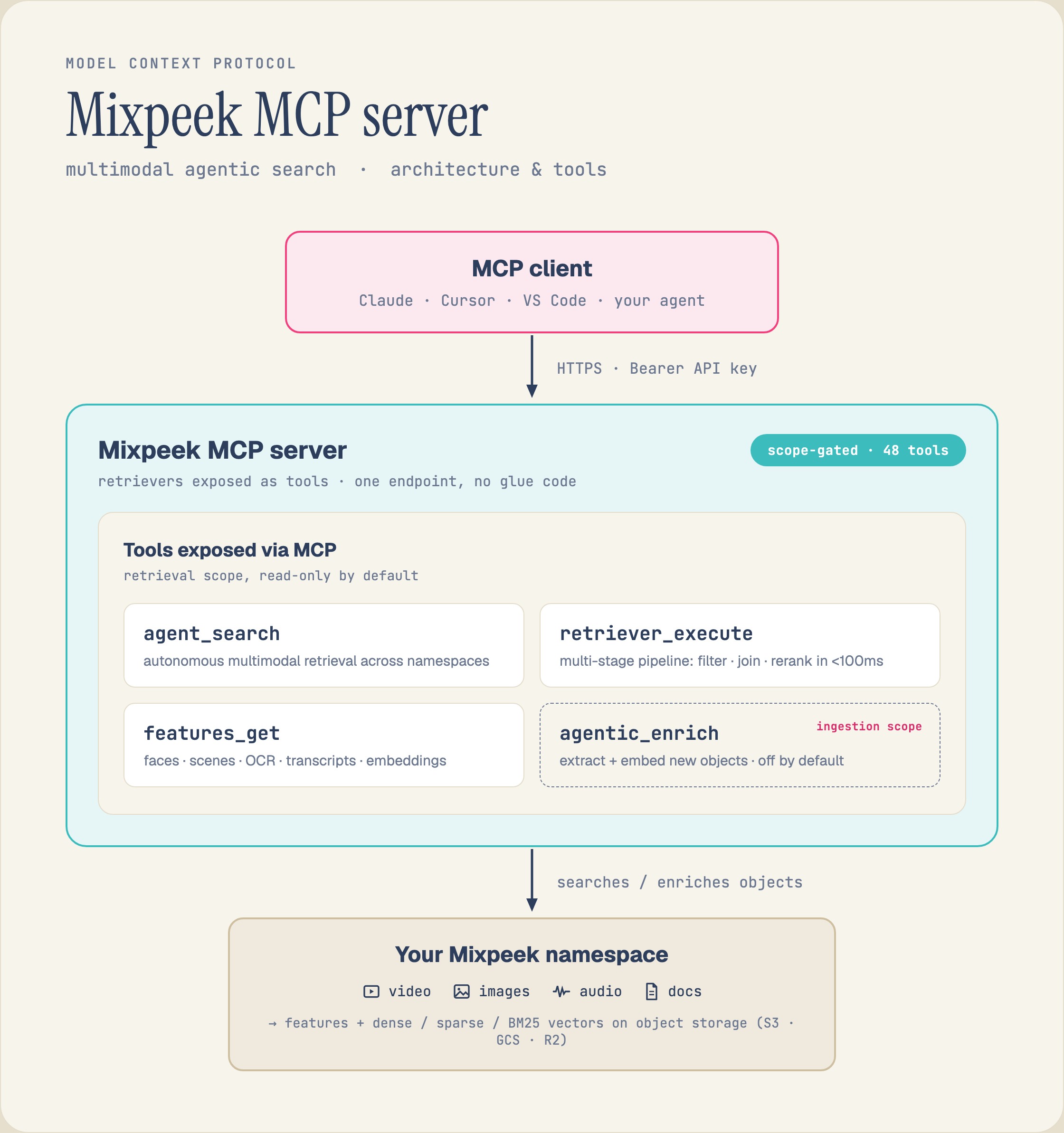
Connect Claude (or any MCP-compatible client) to Mixpeek so it can search video, image, and audio content.
 ## Hosted Server URLs
Mixpeek runs four hosted MCP servers. Each exposes a different subset of tools so you only load what your agent needs.
| Scope | URL | Tools |
| ------------- | --------------------------------------- | -------------------------------------- |
| **Full** | `https://mcp.mixpeek.com/mcp` | 48 -- everything |
| **Ingestion** | `https://mcp.mixpeek.com/ingestion/mcp` | 20 -- buckets, collections, documents |
| **Retrieval** | `https://mcp.mixpeek.com/retrieval/mcp` | 11 -- retrievers, agents, search |
| **Admin** | `https://mcp.mixpeek.com/admin/mcp` | 17 -- namespaces, taxonomies, clusters |
For a focused search agent, use the [Per-Retriever Server](#per-retriever-mcp-server) instead. It exposes a single typed `search` tool generated from your retriever's input schema.
***
## Setup
Replace `YOUR_API_KEY` with your key from the [Mixpeek dashboard](https://mixpeek.com/dashboard).
Add this to your Claude Desktop config file (`claude_desktop_config.json`):
```json Full theme={null}
{
"mcpServers": {
"mixpeek": {
"url": "https://mcp.mixpeek.com/mcp",
"headers": {
"Authorization": "Bearer YOUR_API_KEY"
}
}
}
}
```
```json Ingestion theme={null}
{
"mcpServers": {
"mixpeek-ingestion": {
"url": "https://mcp.mixpeek.com/ingestion/mcp",
"headers": {
"Authorization": "Bearer YOUR_API_KEY"
}
}
}
}
```
```json Retrieval theme={null}
{
"mcpServers": {
"mixpeek-retrieval": {
"url": "https://mcp.mixpeek.com/retrieval/mcp",
"headers": {
"Authorization": "Bearer YOUR_API_KEY"
}
}
}
}
```
```json Admin theme={null}
{
"mcpServers": {
"mixpeek-admin": {
"url": "https://mcp.mixpeek.com/admin/mcp",
"headers": {
"Authorization": "Bearer YOUR_API_KEY"
}
}
}
}
```
Run this in your terminal:
```bash Full theme={null}
claude mcp add mixpeek \
--transport streamable-http \
--url https://mcp.mixpeek.com/mcp \
--header "Authorization: Bearer YOUR_API_KEY"
```
```bash Ingestion theme={null}
claude mcp add mixpeek-ingestion \
--transport streamable-http \
--url https://mcp.mixpeek.com/ingestion/mcp \
--header "Authorization: Bearer YOUR_API_KEY"
```
```bash Retrieval theme={null}
claude mcp add mixpeek-retrieval \
--transport streamable-http \
--url https://mcp.mixpeek.com/retrieval/mcp \
--header "Authorization: Bearer YOUR_API_KEY"
```
```bash Admin theme={null}
claude mcp add mixpeek-admin \
--transport streamable-http \
--url https://mcp.mixpeek.com/admin/mcp \
--header "Authorization: Bearer YOUR_API_KEY"
```
***
## Per-Retriever MCP Server
The retriever server is a lightweight MCP server scoped to a **single retriever**. It reads your retriever's `input_schema` at startup and generates a typed `search` tool whose parameters match exactly.
```bash theme={null}
pip install mixpeek-mcp-retriever
```
```bash theme={null}
mixpeek-mcp-retriever \
--retriever-id ret_xxx \
--namespace-id ns_xxx \
--api-key YOUR_API_KEY
```
Add to your Claude Desktop config:
```json theme={null}
{
"mcpServers": {
"my-search": {
"command": "mixpeek-mcp-retriever",
"args": [
"--retriever-id", "ret_xxx",
"--namespace-id", "ns_xxx",
"--api-key", "YOUR_API_KEY"
]
}
}
}
```
The retriever server exposes three tools:
| Tool | Description |
| ---------- | ------------------------------------------------------------------------------------------------------------------------------------------------------------------------------------------------------------ |
| `search` | Execute the retriever. Parameters are generated from the retriever's `input_schema` -- field names, types, required flags, enums, and descriptions. Pagination (`page`, `page_size`) is added automatically. |
| `describe` | Returns structured metadata: retriever ID, name, collections, input fields, and stage configuration. |
| `explain` | Returns a human-readable explanation of the pipeline: what each stage does, in order. |
If your retriever's `input_schema` has a field named `page` or `page_size`, the pagination parameters are automatically renamed to `_pagination_page` and `_pagination_page_size` to avoid conflicts.
You can also run the retriever server over HTTP for deployed agents:
```bash theme={null}
mixpeek-mcp-retriever \
--retriever-id ret_xxx \
--namespace-id ns_xxx \
--api-key YOUR_API_KEY \
--transport http \
--port 8081
```
Or configure everything via environment variables (prefixed with `RETRIEVER_MCP_`):
```bash theme={null}
export RETRIEVER_MCP_RETRIEVER_ID=ret_xxx
export RETRIEVER_MCP_NAMESPACE_ID=ns_xxx
export RETRIEVER_MCP_API_KEY=YOUR_API_KEY
export RETRIEVER_MCP_TRANSPORT=stdio
mixpeek-mcp-retriever
```
***
## Available Tools by Scope
### Ingestion -- 18 tools
| Tool | Description |
| -------------------- | -------------------------------------------- |
| `create_bucket` | Create a new bucket for file storage |
| `list_buckets` | List all buckets in a namespace |
| `get_bucket` | Get bucket details |
| `update_bucket` | Update bucket configuration |
| `delete_bucket` | Delete a bucket and its objects |
| `upload_object` | Upload a file to a bucket from a URL |
| `create_collection` | Create a collection with a feature extractor |
| `list_collections` | List all collections in a namespace |
| `get_collection` | Get collection details |
| `update_collection` | Update collection configuration |
| `clone_collection` | Clone a collection with optional overrides |
| `trigger_collection` | Trigger processing on bucket objects |
| `delete_collection` | Delete a collection and its documents |
| `create_document` | Create a document in a collection |
| `list_documents` | List documents with filters |
| `get_document` | Get a document by ID |
| `update_document` | Update a document |
| `delete_document` | Delete a document |
### Retrieval -- 11 tools
| Tool | Description |
| ---------------------- | -------------------------------------------------- |
| `create_retriever` | Create a multi-stage search pipeline |
| `list_retrievers` | List all retrievers in a namespace |
| `get_retriever` | Get retriever configuration and stages |
| `update_retriever` | Update retriever metadata |
| `clone_retriever` | Clone a retriever with modifications |
| `execute_retriever` | Execute a retriever and get search results |
| `delete_retriever` | Delete a retriever |
| `create_agent_session` | Create a conversational agent session |
| `send_agent_message` | Send a message and get a retriever-backed response |
| `get_agent_history` | Get conversation history |
| `search_namespace` | Search across all resources in a namespace |
### Admin -- 14 tools
| Tool | Description |
| ------------------ | --------------------------------------------- |
| `create_namespace` | Create a workspace |
| `list_namespaces` | List all namespaces |
| `get_namespace` | Get namespace details |
| `update_namespace` | Update namespace configuration |
| `delete_namespace` | Delete a namespace and all its resources |
| `create_taxonomy` | Create a hierarchical classification taxonomy |
| `list_taxonomies` | List all taxonomies |
| `get_taxonomy` | Get taxonomy details |
| `execute_taxonomy` | Apply taxonomy classification to documents |
| `delete_taxonomy` | Delete a taxonomy |
| `create_cluster` | Create a document clustering configuration |
| `list_clusters` | List all clusters |
| `execute_cluster` | Run clustering on a collection |
| `delete_cluster` | Delete a cluster configuration |
***
## Authentication
All MCP servers authenticate with your Mixpeek API key. The key carries the same RBAC permissions as the REST API.
* **Hosted servers (HTTP):** Pass the key in the `Authorization: Bearer YOUR_API_KEY` header. The server injects it into every tool call.
* **Stdio servers:** Set the `MIXPEEK_API_KEY` environment variable, or pass `--api-key` as a CLI argument.
Never commit API keys to version control. For deployed agents, use environment variables or a secrets manager.
***
## Example Conversation
Here is what a session looks like with the Retrieval server connected:
```
You: "Find all video clips where someone mentions quarterly revenue"
Claude: [calls execute_retriever with query="quarterly revenue"]
--> Returns 8 matching video segments with timestamps and transcript excerpts.
You: "Summarize the top 3 results"
Claude: [calls execute_retriever with query="quarterly revenue", then processes results]
--> "1. Q3 earnings call (2:34) -- CFO reports 22% YoY growth.
2. Board presentation (14:12) -- Revenue breakdown by region.
3. Team standup (0:45) -- Quick mention of hitting quarterly target."
You: "Create a retriever that searches product images by description and filters by brand"
Claude: [calls create_retriever with feature_search + attribute_filter stages]
--> "Created retriever ret_abc123 with 2 stages: feature search on image
embeddings, then attribute filter on the brand field."
```
And with the per-retriever server:
```
You: "What does this retriever do?"
Claude: [calls describe]
--> "This is 'Product Search' -- searches your products collection
by text query with an optional category filter, using
feature search -> attribute filter -> reranking."
You: "Search for wireless headphones under electronics"
Claude: [calls search with query="wireless headphones", category="electronics"]
--> Returns top 10 matching products with scores and metadata.
You: "Explain the pipeline"
Claude: [calls explain]
--> "1. feature_search: embeds your query and finds the top 50 matches.
2. attribute_filter: filters by category.
3. rerank: reranks with Cohere down to the top 10."
```
***
## Architecture
```
+-----------------------------------------------------------+
| Claude / AI Agent |
+-----------------------------+-----------------------------+
| MCP Protocol (HTTP / Stdio)
v
+-----------------------------------------------------------+
| Mixpeek MCP Server |
| +--------+ +-----------+ +-----------+ +--------+ |
| | Full | | Ingestion | | Retrieval | | Admin | |
| | (43) | | (18) | | (11) | | (14) | |
| +---+----+ +-----+-----+ +-----+-----+ +---+----+ |
| +------------+-------------+-----------+ |
| Tool Handlers |
+-----------------------------+-----------------------------+
| +--------------------+
| | Retriever Server |
| | (per-retriever, 3) |
| +---------+----------+
+--------+--------+
| API calls
v
+----------------------+
| Mixpeek Platform |
+----------------------+
```
The scoped servers share the same codebase. Scoping controls which tools are registered, not how they execute. Each scope is mounted at its own path prefix (`/ingestion`, `/retrieval`, `/admin`) while the full server runs at `/full`.
***
## Troubleshooting
* Verify the URL is correct (e.g. `https://mcp.mixpeek.com/ingestion/mcp`)
* Check that the `Authorization` header format is `Bearer YOUR_API_KEY`
* Restart Claude Desktop or Claude Code after changing config
* Verify your API key at [mixpeek.com/dashboard](https://mixpeek.com/dashboard)
* Check that the key has permissions for the namespace you're accessing
* Make sure there are no extra spaces in the key
* You may be calling a tool on the wrong scoped server (e.g. `execute_retriever` on `/ingestion`)
* Use the full server if you need all tools
* Ensure `--retriever-id` and `--namespace-id` are correct
* Verify the API key has access to that namespace
* Check that the retriever exists via the API
* Confirm your collection has processed documents (not just uploaded files)
* Check that the retriever's `feature_uri` matches your collection's extractor
* Try a broader query or remove optional filters
## Next Steps
Use Mixpeek as a LangChain tool
Configure multi-stage search pipelines
Choose the right extractor for your data
Understand namespaces, collections, and documents
## Hosted Server URLs
Mixpeek runs four hosted MCP servers. Each exposes a different subset of tools so you only load what your agent needs.
| Scope | URL | Tools |
| ------------- | --------------------------------------- | -------------------------------------- |
| **Full** | `https://mcp.mixpeek.com/mcp` | 48 -- everything |
| **Ingestion** | `https://mcp.mixpeek.com/ingestion/mcp` | 20 -- buckets, collections, documents |
| **Retrieval** | `https://mcp.mixpeek.com/retrieval/mcp` | 11 -- retrievers, agents, search |
| **Admin** | `https://mcp.mixpeek.com/admin/mcp` | 17 -- namespaces, taxonomies, clusters |
For a focused search agent, use the [Per-Retriever Server](#per-retriever-mcp-server) instead. It exposes a single typed `search` tool generated from your retriever's input schema.
***
## Setup
Replace `YOUR_API_KEY` with your key from the [Mixpeek dashboard](https://mixpeek.com/dashboard).
Add this to your Claude Desktop config file (`claude_desktop_config.json`):
```json Full theme={null}
{
"mcpServers": {
"mixpeek": {
"url": "https://mcp.mixpeek.com/mcp",
"headers": {
"Authorization": "Bearer YOUR_API_KEY"
}
}
}
}
```
```json Ingestion theme={null}
{
"mcpServers": {
"mixpeek-ingestion": {
"url": "https://mcp.mixpeek.com/ingestion/mcp",
"headers": {
"Authorization": "Bearer YOUR_API_KEY"
}
}
}
}
```
```json Retrieval theme={null}
{
"mcpServers": {
"mixpeek-retrieval": {
"url": "https://mcp.mixpeek.com/retrieval/mcp",
"headers": {
"Authorization": "Bearer YOUR_API_KEY"
}
}
}
}
```
```json Admin theme={null}
{
"mcpServers": {
"mixpeek-admin": {
"url": "https://mcp.mixpeek.com/admin/mcp",
"headers": {
"Authorization": "Bearer YOUR_API_KEY"
}
}
}
}
```
Run this in your terminal:
```bash Full theme={null}
claude mcp add mixpeek \
--transport streamable-http \
--url https://mcp.mixpeek.com/mcp \
--header "Authorization: Bearer YOUR_API_KEY"
```
```bash Ingestion theme={null}
claude mcp add mixpeek-ingestion \
--transport streamable-http \
--url https://mcp.mixpeek.com/ingestion/mcp \
--header "Authorization: Bearer YOUR_API_KEY"
```
```bash Retrieval theme={null}
claude mcp add mixpeek-retrieval \
--transport streamable-http \
--url https://mcp.mixpeek.com/retrieval/mcp \
--header "Authorization: Bearer YOUR_API_KEY"
```
```bash Admin theme={null}
claude mcp add mixpeek-admin \
--transport streamable-http \
--url https://mcp.mixpeek.com/admin/mcp \
--header "Authorization: Bearer YOUR_API_KEY"
```
***
## Per-Retriever MCP Server
The retriever server is a lightweight MCP server scoped to a **single retriever**. It reads your retriever's `input_schema` at startup and generates a typed `search` tool whose parameters match exactly.
```bash theme={null}
pip install mixpeek-mcp-retriever
```
```bash theme={null}
mixpeek-mcp-retriever \
--retriever-id ret_xxx \
--namespace-id ns_xxx \
--api-key YOUR_API_KEY
```
Add to your Claude Desktop config:
```json theme={null}
{
"mcpServers": {
"my-search": {
"command": "mixpeek-mcp-retriever",
"args": [
"--retriever-id", "ret_xxx",
"--namespace-id", "ns_xxx",
"--api-key", "YOUR_API_KEY"
]
}
}
}
```
The retriever server exposes three tools:
| Tool | Description |
| ---------- | ------------------------------------------------------------------------------------------------------------------------------------------------------------------------------------------------------------ |
| `search` | Execute the retriever. Parameters are generated from the retriever's `input_schema` -- field names, types, required flags, enums, and descriptions. Pagination (`page`, `page_size`) is added automatically. |
| `describe` | Returns structured metadata: retriever ID, name, collections, input fields, and stage configuration. |
| `explain` | Returns a human-readable explanation of the pipeline: what each stage does, in order. |
If your retriever's `input_schema` has a field named `page` or `page_size`, the pagination parameters are automatically renamed to `_pagination_page` and `_pagination_page_size` to avoid conflicts.
You can also run the retriever server over HTTP for deployed agents:
```bash theme={null}
mixpeek-mcp-retriever \
--retriever-id ret_xxx \
--namespace-id ns_xxx \
--api-key YOUR_API_KEY \
--transport http \
--port 8081
```
Or configure everything via environment variables (prefixed with `RETRIEVER_MCP_`):
```bash theme={null}
export RETRIEVER_MCP_RETRIEVER_ID=ret_xxx
export RETRIEVER_MCP_NAMESPACE_ID=ns_xxx
export RETRIEVER_MCP_API_KEY=YOUR_API_KEY
export RETRIEVER_MCP_TRANSPORT=stdio
mixpeek-mcp-retriever
```
***
## Available Tools by Scope
### Ingestion -- 18 tools
| Tool | Description |
| -------------------- | -------------------------------------------- |
| `create_bucket` | Create a new bucket for file storage |
| `list_buckets` | List all buckets in a namespace |
| `get_bucket` | Get bucket details |
| `update_bucket` | Update bucket configuration |
| `delete_bucket` | Delete a bucket and its objects |
| `upload_object` | Upload a file to a bucket from a URL |
| `create_collection` | Create a collection with a feature extractor |
| `list_collections` | List all collections in a namespace |
| `get_collection` | Get collection details |
| `update_collection` | Update collection configuration |
| `clone_collection` | Clone a collection with optional overrides |
| `trigger_collection` | Trigger processing on bucket objects |
| `delete_collection` | Delete a collection and its documents |
| `create_document` | Create a document in a collection |
| `list_documents` | List documents with filters |
| `get_document` | Get a document by ID |
| `update_document` | Update a document |
| `delete_document` | Delete a document |
### Retrieval -- 11 tools
| Tool | Description |
| ---------------------- | -------------------------------------------------- |
| `create_retriever` | Create a multi-stage search pipeline |
| `list_retrievers` | List all retrievers in a namespace |
| `get_retriever` | Get retriever configuration and stages |
| `update_retriever` | Update retriever metadata |
| `clone_retriever` | Clone a retriever with modifications |
| `execute_retriever` | Execute a retriever and get search results |
| `delete_retriever` | Delete a retriever |
| `create_agent_session` | Create a conversational agent session |
| `send_agent_message` | Send a message and get a retriever-backed response |
| `get_agent_history` | Get conversation history |
| `search_namespace` | Search across all resources in a namespace |
### Admin -- 14 tools
| Tool | Description |
| ------------------ | --------------------------------------------- |
| `create_namespace` | Create a workspace |
| `list_namespaces` | List all namespaces |
| `get_namespace` | Get namespace details |
| `update_namespace` | Update namespace configuration |
| `delete_namespace` | Delete a namespace and all its resources |
| `create_taxonomy` | Create a hierarchical classification taxonomy |
| `list_taxonomies` | List all taxonomies |
| `get_taxonomy` | Get taxonomy details |
| `execute_taxonomy` | Apply taxonomy classification to documents |
| `delete_taxonomy` | Delete a taxonomy |
| `create_cluster` | Create a document clustering configuration |
| `list_clusters` | List all clusters |
| `execute_cluster` | Run clustering on a collection |
| `delete_cluster` | Delete a cluster configuration |
***
## Authentication
All MCP servers authenticate with your Mixpeek API key. The key carries the same RBAC permissions as the REST API.
* **Hosted servers (HTTP):** Pass the key in the `Authorization: Bearer YOUR_API_KEY` header. The server injects it into every tool call.
* **Stdio servers:** Set the `MIXPEEK_API_KEY` environment variable, or pass `--api-key` as a CLI argument.
Never commit API keys to version control. For deployed agents, use environment variables or a secrets manager.
***
## Example Conversation
Here is what a session looks like with the Retrieval server connected:
```
You: "Find all video clips where someone mentions quarterly revenue"
Claude: [calls execute_retriever with query="quarterly revenue"]
--> Returns 8 matching video segments with timestamps and transcript excerpts.
You: "Summarize the top 3 results"
Claude: [calls execute_retriever with query="quarterly revenue", then processes results]
--> "1. Q3 earnings call (2:34) -- CFO reports 22% YoY growth.
2. Board presentation (14:12) -- Revenue breakdown by region.
3. Team standup (0:45) -- Quick mention of hitting quarterly target."
You: "Create a retriever that searches product images by description and filters by brand"
Claude: [calls create_retriever with feature_search + attribute_filter stages]
--> "Created retriever ret_abc123 with 2 stages: feature search on image
embeddings, then attribute filter on the brand field."
```
And with the per-retriever server:
```
You: "What does this retriever do?"
Claude: [calls describe]
--> "This is 'Product Search' -- searches your products collection
by text query with an optional category filter, using
feature search -> attribute filter -> reranking."
You: "Search for wireless headphones under electronics"
Claude: [calls search with query="wireless headphones", category="electronics"]
--> Returns top 10 matching products with scores and metadata.
You: "Explain the pipeline"
Claude: [calls explain]
--> "1. feature_search: embeds your query and finds the top 50 matches.
2. attribute_filter: filters by category.
3. rerank: reranks with Cohere down to the top 10."
```
***
## Architecture
```
+-----------------------------------------------------------+
| Claude / AI Agent |
+-----------------------------+-----------------------------+
| MCP Protocol (HTTP / Stdio)
v
+-----------------------------------------------------------+
| Mixpeek MCP Server |
| +--------+ +-----------+ +-----------+ +--------+ |
| | Full | | Ingestion | | Retrieval | | Admin | |
| | (43) | | (18) | | (11) | | (14) | |
| +---+----+ +-----+-----+ +-----+-----+ +---+----+ |
| +------------+-------------+-----------+ |
| Tool Handlers |
+-----------------------------+-----------------------------+
| +--------------------+
| | Retriever Server |
| | (per-retriever, 3) |
| +---------+----------+
+--------+--------+
| API calls
v
+----------------------+
| Mixpeek Platform |
+----------------------+
```
The scoped servers share the same codebase. Scoping controls which tools are registered, not how they execute. Each scope is mounted at its own path prefix (`/ingestion`, `/retrieval`, `/admin`) while the full server runs at `/full`.
***
## Troubleshooting
* Verify the URL is correct (e.g. `https://mcp.mixpeek.com/ingestion/mcp`)
* Check that the `Authorization` header format is `Bearer YOUR_API_KEY`
* Restart Claude Desktop or Claude Code after changing config
* Verify your API key at [mixpeek.com/dashboard](https://mixpeek.com/dashboard)
* Check that the key has permissions for the namespace you're accessing
* Make sure there are no extra spaces in the key
* You may be calling a tool on the wrong scoped server (e.g. `execute_retriever` on `/ingestion`)
* Use the full server if you need all tools
* Ensure `--retriever-id` and `--namespace-id` are correct
* Verify the API key has access to that namespace
* Check that the retriever exists via the API
* Confirm your collection has processed documents (not just uploaded files)
* Check that the retriever's `feature_uri` matches your collection's extractor
* Try a broader query or remove optional filters
## Next Steps
Use Mixpeek as a LangChain tool
Configure multi-stage search pipelines
Choose the right extractor for your data
Understand namespaces, collections, and documents