> ## Documentation Index
> Fetch the complete documentation index at: https://docs.mixpeek.com/docs/llms.txt
> Use this file to discover all available pages before exploring further.
# Introduction
> Mixpeek gives AI agents the ability to see, hear, and understand multimodal content
Your AI agent can read text. It cannot watch a video, scan a photo for faces, or search audio by what was said. Mixpeek is the infrastructure layer that gives agents access to video, images, audio, and documents through a single API.
## How It Works
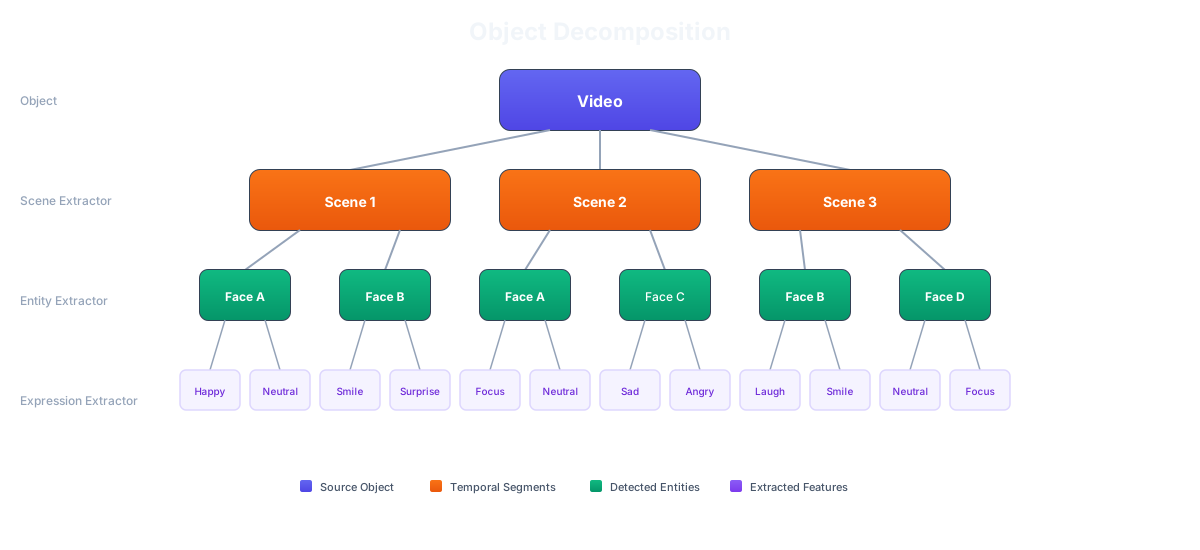
Upload video, images, audio, and documents to [Buckets](/platform/data-model#create-a-bucket). Mixpeek runs feature extraction automatically — faces, objects, transcripts, embeddings, and structured metadata all get indexed into searchable [Collections](/overview/concepts).
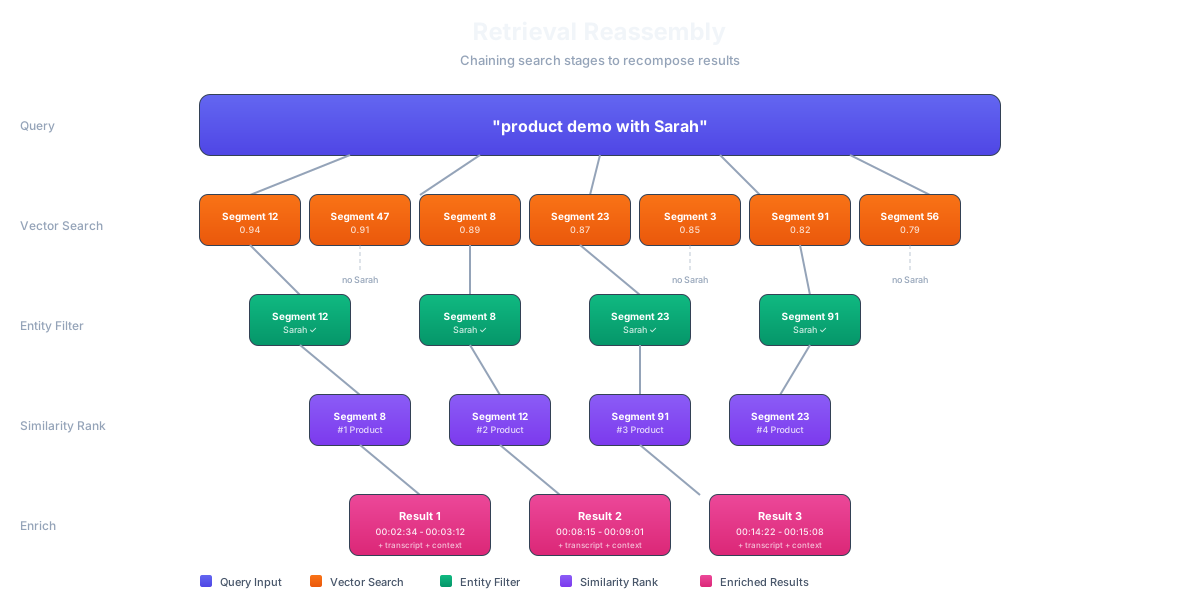
 Build retrieval pipelines that your agent calls. Semantic search, face search, object search, transcript search — chain them together into multi-stage [Retrievers](/retrieval/retrievers) and expose them as a single endpoint.
 Wire Mixpeek into your agent as a [LangChain tool](/integrations/agents#langchain), an [MCP server](/integrations/agents#mcp-model-context-protocol), or a direct REST call. Your agent sends a query, gets structured results back, and acts on them.
**Already have embeddings?** Skip extraction entirely — bring your own vectors and search instantly with the [Mixpeek Vector Store](/vector-store/overview). 1M vectors free, 60 seconds to first query.
## Quickstart
Index multimodal content and search it in under 10 minutes — LangChain, MCP, or REST
## What Can You Build?
Pick an outcome and follow the guide — each one is end-to-end and copy-pasteable.
Find moments by what's shown or said — visual + speech embeddings
Use an image or clip as the query to find visually similar media
Combine dense vectors with keyword/BM25 and attribute filters
Push the most relevant results to the top with a cross-encoder
Group, label, and visualize a collection automatically
Classify content against your own hierarchy with a multimodal join
Enforce access control with built-in ACLs or external OpenFGA
Use Mixpeek as a standalone vector store — upsert and query instantly
Improve ranking automatically from click and reward signals
Re-extract, validate, and cut over to a new model with no downtime
## What Gets Extracted
| File Type | Extracted Features |
| ------------------------------------------------ | -------------------------------------------------------------------------------------------------------------------------------------------------------------------------- |
| **[Video](/processing/extractors/multimodal)** | Face embeddings (ArcFace 512D), scene descriptions (Gemini), visual embeddings (Vertex AI 1408D), transcripts (Whisper), transcript embeddings (E5-Large 1024D), keyframes |
| **[Images](/processing/extractors/image)** | Visual embeddings (SigLIP 768D or Vertex AI 1408D), face embeddings (ArcFace 512D), OCR text, descriptions, structured extraction |
| **[Audio](/processing/extractors/multimodal)** | Transcripts (Whisper), transcript embeddings (E5-Large 1024D), multimodal audio embeddings (Vertex AI 1408D) |
| **[Documents](/processing/extractors/document)** | Text chunks, text embeddings (E5-Large 1024D), OCR for scanned PDFs, structured extraction |
Each extracted feature becomes an independently searchable document. A single video can produce hundreds of documents — one per face, one per transcript segment, one per scene.
## Key Concepts
* **Namespaces** isolate data between tenants, environments, or projects. Every API request includes a namespace header.
* **Buckets** hold your raw files. Upload once, process many ways.
* **Collections** define what gets extracted. Each collection runs a feature extractor (CLIP, Whisper, LayoutLM, etc.) against objects in a bucket.
* **Retrievers** are search pipelines you configure in JSON. Chain stages together — vector search, face matching, filters, re-ranking — and expose the result as one endpoint your agent calls.
## Next Steps
Understand namespaces, buckets, collections, and retrievers in depth
See how namespaces, buckets, collections, objects, and features fit together
Learn what each extractor does and how to configure it
Step-by-step guides for common use cases
Wire Mixpeek into your agent as a [LangChain tool](/integrations/agents#langchain), an [MCP server](/integrations/agents#mcp-model-context-protocol), or a direct REST call. Your agent sends a query, gets structured results back, and acts on them.
**Already have embeddings?** Skip extraction entirely — bring your own vectors and search instantly with the [Mixpeek Vector Store](/vector-store/overview). 1M vectors free, 60 seconds to first query.
## Quickstart
Index multimodal content and search it in under 10 minutes — LangChain, MCP, or REST
## What Can You Build?
Pick an outcome and follow the guide — each one is end-to-end and copy-pasteable.
Find moments by what's shown or said — visual + speech embeddings
Use an image or clip as the query to find visually similar media
Combine dense vectors with keyword/BM25 and attribute filters
Push the most relevant results to the top with a cross-encoder
Group, label, and visualize a collection automatically
Classify content against your own hierarchy with a multimodal join
Enforce access control with built-in ACLs or external OpenFGA
Use Mixpeek as a standalone vector store — upsert and query instantly
Improve ranking automatically from click and reward signals
Re-extract, validate, and cut over to a new model with no downtime
## What Gets Extracted
| File Type | Extracted Features |
| ------------------------------------------------ | -------------------------------------------------------------------------------------------------------------------------------------------------------------------------- |
| **[Video](/processing/extractors/multimodal)** | Face embeddings (ArcFace 512D), scene descriptions (Gemini), visual embeddings (Vertex AI 1408D), transcripts (Whisper), transcript embeddings (E5-Large 1024D), keyframes |
| **[Images](/processing/extractors/image)** | Visual embeddings (SigLIP 768D or Vertex AI 1408D), face embeddings (ArcFace 512D), OCR text, descriptions, structured extraction |
| **[Audio](/processing/extractors/multimodal)** | Transcripts (Whisper), transcript embeddings (E5-Large 1024D), multimodal audio embeddings (Vertex AI 1408D) |
| **[Documents](/processing/extractors/document)** | Text chunks, text embeddings (E5-Large 1024D), OCR for scanned PDFs, structured extraction |
Each extracted feature becomes an independently searchable document. A single video can produce hundreds of documents — one per face, one per transcript segment, one per scene.
## Key Concepts
* **Namespaces** isolate data between tenants, environments, or projects. Every API request includes a namespace header.
* **Buckets** hold your raw files. Upload once, process many ways.
* **Collections** define what gets extracted. Each collection runs a feature extractor (CLIP, Whisper, LayoutLM, etc.) against objects in a bucket.
* **Retrievers** are search pipelines you configure in JSON. Chain stages together — vector search, face matching, filters, re-ranking — and expose the result as one endpoint your agent calls.
## Next Steps
Understand namespaces, buckets, collections, and retrievers in depth
See how namespaces, buckets, collections, objects, and features fit together
Learn what each extractor does and how to configure it
Step-by-step guides for common use cases