> ## Documentation Index
> Fetch the complete documentation index at: https://docs.mixpeek.com/docs/llms.txt
> Use this file to discover all available pages before exploring further.
# Decomposition
> How Mixpeek turns raw objects into searchable documents and queryable features
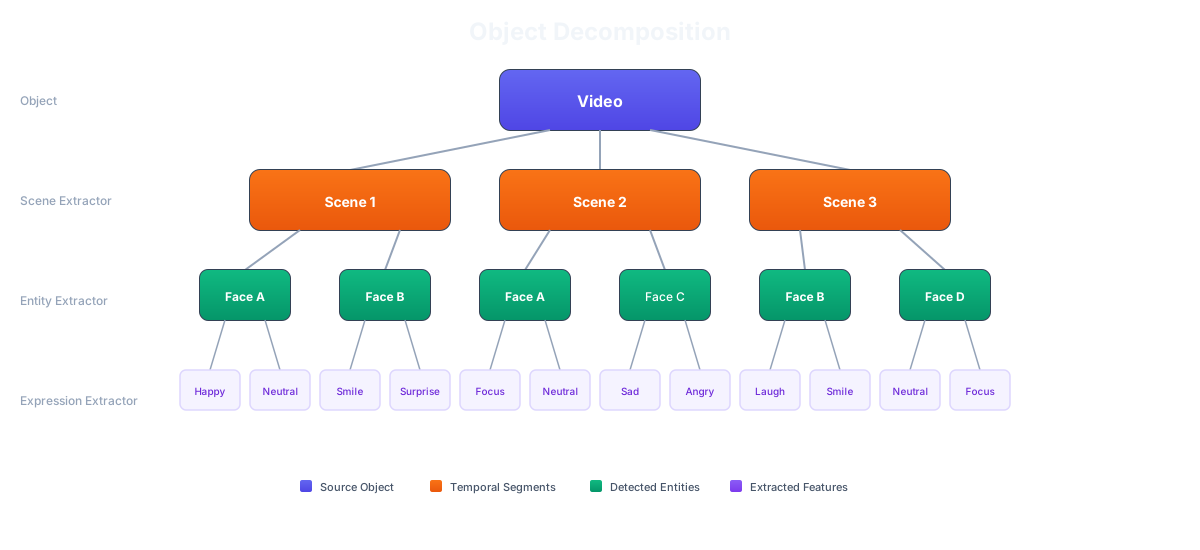 Decomposition is the core transformation in Mixpeek. A raw file (video, PDF, image, audio) goes in as one **object**. It comes out as many **documents**, each with its own **features**. This is what makes sub-file search possible — you search *within* a video at the segment level, not *for* the video as a whole.
## Three Primitives
| Primitive | What It Is | Role |
| ------------ | -------------------------------------------------------------------------------------- | --------------------------------------------------------------- |
| **Object** | Raw file or record in a bucket (video, PDF, JSON row, image). | The input boundary. You upload objects. |
| **Document** | One row of output in a collection, produced by decomposition. | The query boundary. You search documents. |
| **Feature** | A named output attached to a document (embedding, transcript, OCR text, label, score). | The composition boundary. Retrievers reference features by URI. |
The pipeline is always:
```
Object (bucket) → Decomposition → Document (collection) → Features (MVS + MongoDB)
```
## What Decomposition Decides
The feature extractor controls *how* an object is decomposed into documents. The strategy depends on the content type:
| Content Type | Decomposition Strategy | Result |
| ------------------- | ------------------------------------------------- | -------------------------------------------------------------------------------- |
| **Video** | Time intervals, scene boundaries, or silence gaps | Each segment = 1 document with visual embedding + transcript + scene description |
| **Audio** | Silence boundaries or fixed intervals | Each segment = 1 document with transcript + transcript embedding |
| **PDF / Document** | Page, paragraph, or sentence boundaries | Each chunk = 1 document with text content + text embedding |
| **Image** | No split (1:1) | 1 image = 1 document with visual embedding + OCR + description |
| **Structured data** | Row-level (1:1) | 1 row = 1 document with field-level features |
## Why It Matters
**Without decomposition**, a 30-minute video is one record. Searching for "the moment the CEO mentions revenue" means scanning the entire video. There's no way to return a specific timestamp.
**With decomposition**, that video becomes \~180 ten-second segments, each with its own transcript embedding, visual embedding, and scene description. A search returns the exact segment at 14:30 where the CEO says "revenue grew 22%."
The same applies to documents: a 200-page PDF becomes 200 searchable chunks instead of one monolithic record.
## Feature URIs
Every feature produced by decomposition gets a URI that uniquely identifies it:
```
mixpeek://multimodal_extractor@v1/vertex_multimodal_embedding
mixpeek://face_identity_extractor@v1/insightface__arcface
mixpeek://my_custom_plugin@1.0.0/domain_embedding
```
Retrievers, taxonomies, and clusters reference features by URI. This is the composition boundary — you can build a retriever that searches `multimodal_embedding` in one stage and `face_embedding` in another, even though they were produced by different extractors.
## Configuring Decomposition
Decomposition is configured via the `feature_extractor` field on a collection:
```json theme={null}
{
"collection_name": "video-library",
"source": { "type": "bucket", "bucket_ids": ["bkt_videos"] },
"feature_extractor": {
"feature_extractor_name": "multimodal_extractor",
"version": "v1",
"input_mappings": {
"video": "video_url"
},
"settings": {
"video_segmentation": {
"type": "time",
"interval_sec": 10
},
"run_transcription": true,
"run_scene_description": true
}
}
}
```
The `settings` object controls the decomposition strategy. Each extractor has its own settings — see the extractor-specific pages for details:
Time, scene, and silence segmentation strategies
Visual embeddings, OCR, and structured extraction
Silence-boundary segmentation and transcription
Page, paragraph, and sentence chunking
## Multi-Tier Decomposition
When a single extraction pass isn't enough — e.g., you need to transcribe audio *then* embed the transcription *then* classify each chunk — you chain collections. Each tier reads the output of the previous one, forming a DAG:
```
Tier 1: raw video → segments with transcripts
Tier 2: tier-1 docs → text chunks with embeddings
Tier 3: tier-2 docs → classifications per chunk
```
The engine resolves tiers automatically and executes them in dependency order. See [Multi-Tier Feature Extraction](/processing/multi-tier-extractors) for the full guide.
## Lineage
Every document tracks its lineage back to the original object:
```json theme={null}
{
"root_object_id": "obj_video_123",
"root_bucket_id": "bkt_marketing",
"source_collection_id": "col_segments",
"lineage_path": "bkt_marketing/col_segments/col_chunks"
}
```
This lets you trace any search result back through tiers to the original file. Use the [Lineage API](/api-reference/document-lineage/get-document-lineage) to visualize the decomposition tree.
Decomposition is the core transformation in Mixpeek. A raw file (video, PDF, image, audio) goes in as one **object**. It comes out as many **documents**, each with its own **features**. This is what makes sub-file search possible — you search *within* a video at the segment level, not *for* the video as a whole.
## Three Primitives
| Primitive | What It Is | Role |
| ------------ | -------------------------------------------------------------------------------------- | --------------------------------------------------------------- |
| **Object** | Raw file or record in a bucket (video, PDF, JSON row, image). | The input boundary. You upload objects. |
| **Document** | One row of output in a collection, produced by decomposition. | The query boundary. You search documents. |
| **Feature** | A named output attached to a document (embedding, transcript, OCR text, label, score). | The composition boundary. Retrievers reference features by URI. |
The pipeline is always:
```
Object (bucket) → Decomposition → Document (collection) → Features (MVS + MongoDB)
```
## What Decomposition Decides
The feature extractor controls *how* an object is decomposed into documents. The strategy depends on the content type:
| Content Type | Decomposition Strategy | Result |
| ------------------- | ------------------------------------------------- | -------------------------------------------------------------------------------- |
| **Video** | Time intervals, scene boundaries, or silence gaps | Each segment = 1 document with visual embedding + transcript + scene description |
| **Audio** | Silence boundaries or fixed intervals | Each segment = 1 document with transcript + transcript embedding |
| **PDF / Document** | Page, paragraph, or sentence boundaries | Each chunk = 1 document with text content + text embedding |
| **Image** | No split (1:1) | 1 image = 1 document with visual embedding + OCR + description |
| **Structured data** | Row-level (1:1) | 1 row = 1 document with field-level features |
## Why It Matters
**Without decomposition**, a 30-minute video is one record. Searching for "the moment the CEO mentions revenue" means scanning the entire video. There's no way to return a specific timestamp.
**With decomposition**, that video becomes \~180 ten-second segments, each with its own transcript embedding, visual embedding, and scene description. A search returns the exact segment at 14:30 where the CEO says "revenue grew 22%."
The same applies to documents: a 200-page PDF becomes 200 searchable chunks instead of one monolithic record.
## Feature URIs
Every feature produced by decomposition gets a URI that uniquely identifies it:
```
mixpeek://multimodal_extractor@v1/vertex_multimodal_embedding
mixpeek://face_identity_extractor@v1/insightface__arcface
mixpeek://my_custom_plugin@1.0.0/domain_embedding
```
Retrievers, taxonomies, and clusters reference features by URI. This is the composition boundary — you can build a retriever that searches `multimodal_embedding` in one stage and `face_embedding` in another, even though they were produced by different extractors.
## Configuring Decomposition
Decomposition is configured via the `feature_extractor` field on a collection:
```json theme={null}
{
"collection_name": "video-library",
"source": { "type": "bucket", "bucket_ids": ["bkt_videos"] },
"feature_extractor": {
"feature_extractor_name": "multimodal_extractor",
"version": "v1",
"input_mappings": {
"video": "video_url"
},
"settings": {
"video_segmentation": {
"type": "time",
"interval_sec": 10
},
"run_transcription": true,
"run_scene_description": true
}
}
}
```
The `settings` object controls the decomposition strategy. Each extractor has its own settings — see the extractor-specific pages for details:
Time, scene, and silence segmentation strategies
Visual embeddings, OCR, and structured extraction
Silence-boundary segmentation and transcription
Page, paragraph, and sentence chunking
## Multi-Tier Decomposition
When a single extraction pass isn't enough — e.g., you need to transcribe audio *then* embed the transcription *then* classify each chunk — you chain collections. Each tier reads the output of the previous one, forming a DAG:
```
Tier 1: raw video → segments with transcripts
Tier 2: tier-1 docs → text chunks with embeddings
Tier 3: tier-2 docs → classifications per chunk
```
The engine resolves tiers automatically and executes them in dependency order. See [Multi-Tier Feature Extraction](/processing/multi-tier-extractors) for the full guide.
## Lineage
Every document tracks its lineage back to the original object:
```json theme={null}
{
"root_object_id": "obj_video_123",
"root_bucket_id": "bkt_marketing",
"source_collection_id": "col_segments",
"lineage_path": "bkt_marketing/col_segments/col_chunks"
}
```
This lets you trace any search result back through tiers to the original file. Use the [Lineage API](/api-reference/document-lineage/get-document-lineage) to visualize the decomposition tree.