Mixpeek is the semantic retrieval layer for unstructured and multimodal data
Your AI agent can read text. It cannot watch a video, scan a photo for faces, or search audio by what was said. Mixpeek is the semantic retrieval layer for unstructured and multimodal data: it turns video, images, audio and documents into named semantic features, then serves them through retrievers your agent calls by name.
Start building on Mixpeek
Create a workspace and run your first multimodal search — index your own video, images, audio, or documents in minutes.
Upload video, images, audio, and documents to Buckets. Mixpeek runs feature extraction automatically — faces, objects, transcripts, embeddings, and structured metadata all get indexed into searchable Collections.
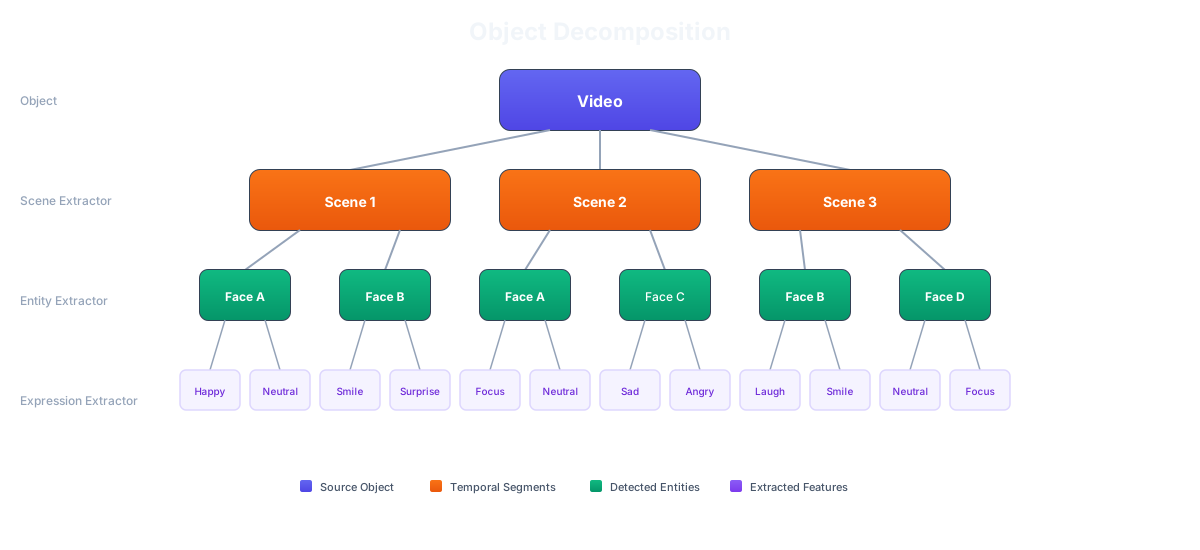
Breaking down a video into semantic layers
See this running on real content — 7 PDFs that fan out into 59 searchable knowledge-graph nodes — in the sample data.
2
Search
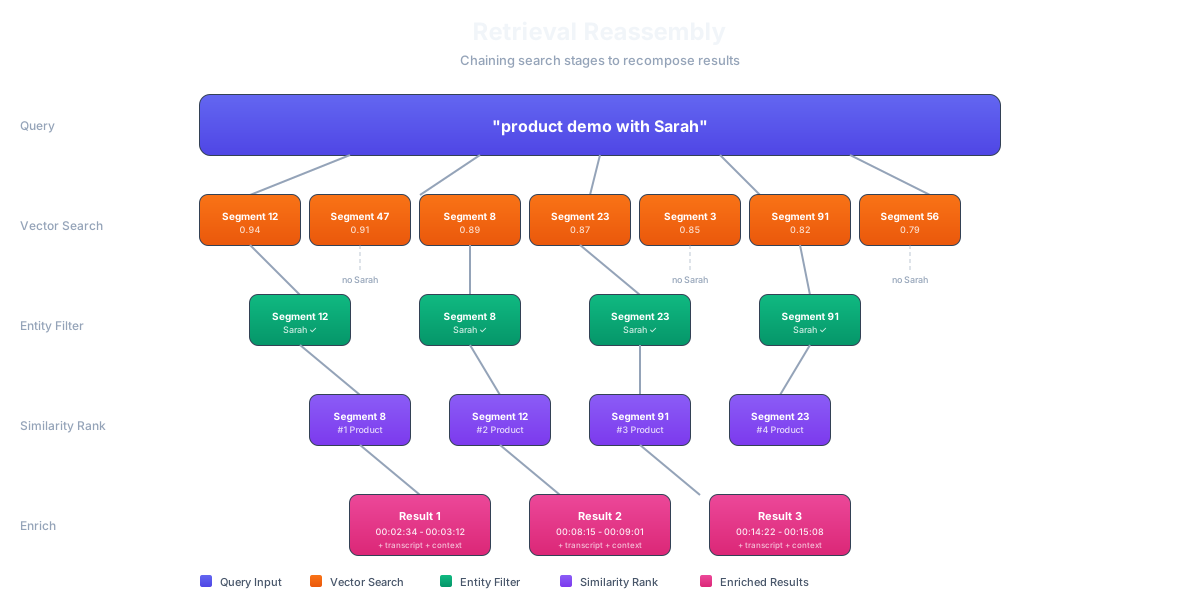
Build retrieval pipelines that your agent calls. Semantic search, face search, object search, transcript search — chain them together into multi-stage Retrievers and expose them as a single endpoint.
Chaining search stages into a retrieval pipeline
Run this exact pipeline against the sample data right now — no account or API key needed.
3
Integrate
Wire Mixpeek into your agent as a LangChain tool, an MCP server, or a direct REST call. Your agent sends a query, gets structured results back, and acts on them.
Already have embeddings? Skip extraction entirely — bring your own vectors and search instantly with the Mixpeek Vector Store. Sixty seconds to first query.
Text chunks, text embeddings (E5-Large 1024D), OCR for scanned PDFs, structured extraction
Each extracted feature becomes an independently searchable document. A single video can produce hundreds of documents — one per face, one per transcript segment, one per scene.
Namespaces isolate data between tenants, environments, or projects. Every API request includes a namespace header.
Buckets hold your raw files. Upload once, process many ways.
Collections define what gets extracted. Each collection runs a feature extractor (CLIP, Whisper, LayoutLM, etc.) against objects in a bucket.
Retrievers are search pipelines you configure in JSON. Chain stages together — vector search, face matching, filters, re-ranking — and expose the result as one endpoint your agent calls.