

1
Generate a manifest
2
Check it and apply it
Read
validation. When it says valid: true, send manifest to POST /v1/manifest/apply.3
Improve it with the manifest loop
Give the loop your data and a few labelled questions. It returns up to three finalists, each scored on examples it never saw.
Generate a manifest
POST /v1/manifest/generate takes a plain-language description and returns a complete manifest. The model that writes it reads the live extractor and stage catalogs. The answer goes through the same checks as POST /v1/manifest/validate. When those checks find errors, the model gets them back and fixes its answer, up to two times.
string
The manifest as YAML. Apply it as it is, or edit it first.
object
valid, errors and warnings. When valid is false, the errors stay listed so you can fix them by hand.integer
How many times the model fixed its own answer.
object
The manifest priced at list rates: per 1,000 items, and per month.
object
The templates and catalog models closest to your description:
{"templates": [...], "models": [...]}.object
Only when you send
inventory (files per bucket): what indexing those files costs, the same quote POST /v1/organizations/billing/estimate returns.Improve it with the manifest loop
The loop takes a starting manifest and tries changes. It scores each change on labelled questions and keeps the best. An AI agent, the driver, decides what to try. It writes down what it expects before it sees each score.The loop runs from a script in the Mixpeek repository (
server/scripts/manifest_loop). There is no hosted endpoint for it. Each change it tries is an ordinary manifest applied through the API, so a finalist deploys like any other manifest.What the driver can change
A retriever change re-ranks what is already indexed, so it costs seconds. A model or extractor change re-processes the data. The loop gives those a fixed budget of extraction minutes per run.Why you can trust the score
The examples are split by source file, so near-identical frames of one video never land on both sides. Every reported number is a held-out score with a 95% bootstrap interval. A change that only wins on the tuning half usually loses on held-out.What it found
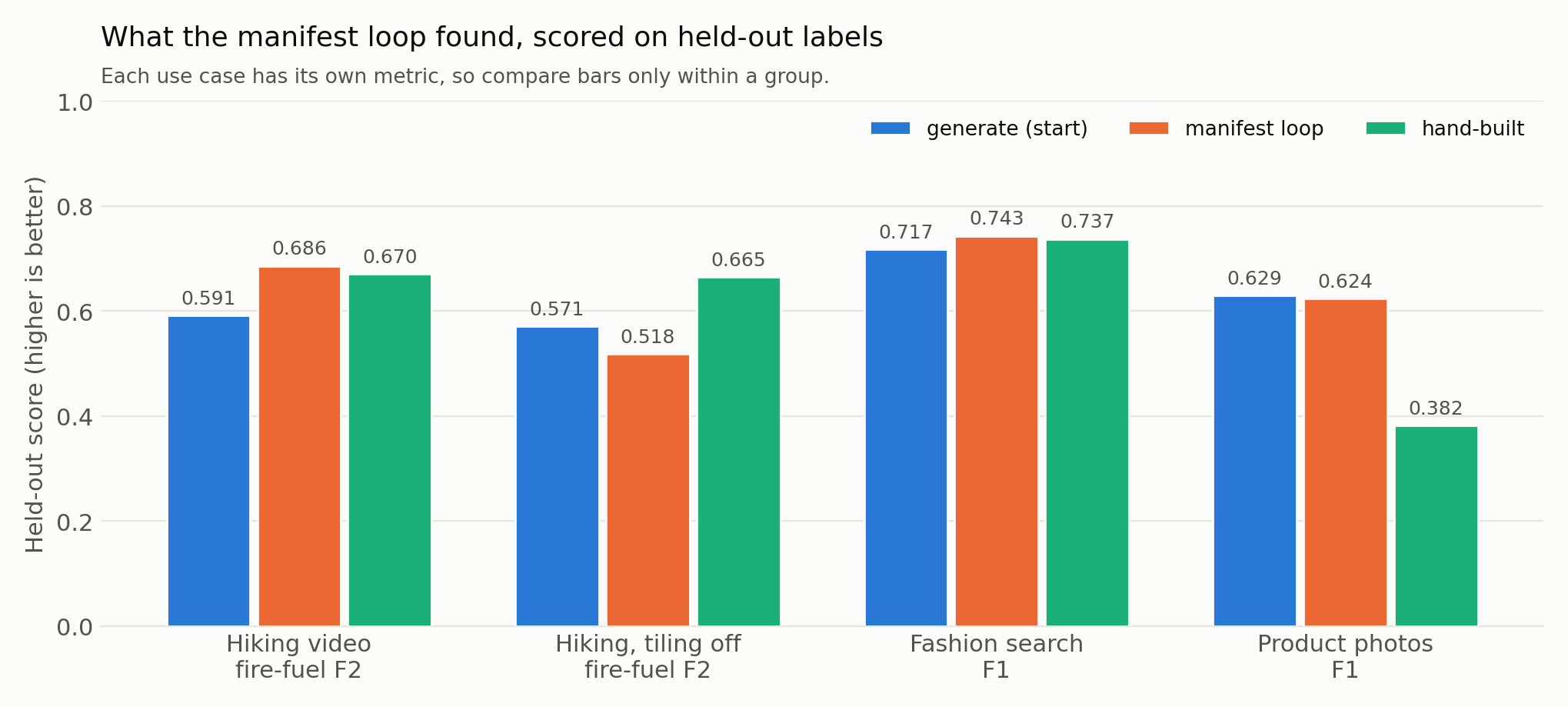
With every tool available, the loop matched the best hand-built manifest on these benchmarks. Its lead over generate was within the noise of the held-out intervals. With tiling turned off, the loop picked a model that won on one tuning clip, and it scored below generate on held-out.
Run it
The operator runs held-out scoring (
heldout.py) and the data split (prepare.py). The driver never sees the held-out labels.
Iterate with your own agent
You can run the same loop without the script. Any coding agent that can call the API (Claude Code, Codex, Cursor) can drive it. It needs three things from you:- Labelled questions. Each question names the files or documents that should come back for it. More questions give a narrower interval. With the fashion benchmark’s 41 questions, the loop’s 0.026 lead over generate stayed inside the noise.
- A held-out split. Split by source file before the agent starts, so near-identical frames of one video never land on both sides. Keep the held-out labels away from the agent until the end.
- A budget. Extraction minutes for model and extractor changes. Retriever changes cost seconds.
Pick the metric for the cost of a miss.
f2 weighs recall above precision, so use it when missing a relevant document costs more than an extra one, as with the fire-fuel classes above. Use ndcg or mrr when order matters most.
Check your setup on a public benchmark first. Text-to-image retrieval on COCO 2017 (the 5,000-image Karpathy test split) or Flickr30k (the 1,000-image Karpathy test split) has published recall@1 numbers to compare against. CLIP ViT-B/16 at 224 px is published at 33.1 on COCO and 62.1 on Flickr30k. A setup that lands near those numbers loses nothing in indexing or retrieval, so any gap on your own data comes from the manifest.
A prompt to start the agent
Models, plugins and templates
- A model is weights. You name it by reference:
hf://org/name@revision,mixpeek://...orcatalog://<id>. - A plugin is a container image with your code and packages, plus the models it declares. An extractor is the kind of plugin that fills a collection. The built-in extractors are plugins of the same shape.
- A template is a manifest that composes plugins into collections and retrievers.
Plugins as images
Where they run
A single-tenant deployment has its own project, cluster, storage and credentials. Your code there can reach only your data. Custom images are off by default everywhere. Set
CUSTOM_PLUGIN_IMAGES_ENABLED=1 on a deployment that may run them. Apply checks this, and the engine checks it again when it starts each batch job.
Plugin images on an Enterprise single-tenant deployment are set up with your account team. The batch path there runs your image as the job’s image. The end-to-end runs so far are on the standalone container.
Declare it in a manifest
string
required
The image, pinned by digest:
<registry>/<name>@sha256:<64 hex>. A tag is refused at apply and again at job start, because a tag can point to new code later.list
The models your plugin uses. Each gets its own deployment for this extractor alone, with its own
min_replicas and max_replicas. No other extractor calls it.string
Required when
min_replicas is above 0. Say why the model stays warm when idle.GET /v1/discovery/models.
Scale to zero and cold starts
A model atmin_replicas: 0 costs nothing when idle and wakes on the next request.
- Batch: the job waits for the model to wake.
- Search: a query that reaches a sleeping model waits for it, up to 45 seconds by default. The first query after an idle spell is slow; the next ones are fast.
- Never wait: set
min_replicas: 1with amin_reason. That keeps one replica running, which you pay for while idle.
Build the image
A plugin buildsFROM the stock image of the deployment it runs on. Your code goes where the engine finds extractors. The image holds code and packages; models come from serve.
- definition.py
- pipeline.py
- init.py
engine.extractors.plugin_sdk.model_app(ref) returns the deployment name of a declared model, for code that calls it directly. Custom serving code inside the image is not supported yet. Your models are served by the platform’s serving path, from the references you declare.
Test it locally
The standalone container has no container runtime inside it. A plugin image runs as a second container that shares the stack’s network and runs a small Ray of its own.1
Start the stack with custom images on
2
Build the image and get its digest from a local registry
3
Start a plugin worker for that digest
4
Apply a manifest that names the digest
Put the digest in
source.image and apply the manifest. Apply deploys your models, runs a short job in your image to read its definition, and creates the extractor. Batches on its collections then run in your image.plugin-variant NAME --dir DIR.
What a plugin gets in its environment
What a plugin gets in its environment
No platform-wide credential is added to a plugin job. Provider keys, proxies and the engine’s own tokens are removed. On a single-tenant deployment the pod’s secret belongs to that tenant alone.
One image per batch job
One image per batch job
A batch job runs one image. Re-applying an extractor with a new digest replaces its old image.
Limits
Limits
Models must have a catalog record with a commercial licence. Custom serving code in the image is not supported yet. The first build on a new machine copies the whole base image, which takes several minutes. Later builds take seconds.
Manifest reference
Every manifest field, validate, plan and apply.
Custom extractors
Registry-backed extractors and submissions on the shared API.