Multimodal Content Taxonomies
Automatically classify any content into structured categories like product types, content topics, or custom hierarchies. A warehouse-native enrichment layer: the multimodal equivalent of a SQL JOIN that matches by similarity, not just keys.
What You'll Get
Reduce Manual Tagging 90%
Auto-classify across 4 modalities
Improve Search Relevance 3x
Category-based filtering and discovery
Classify 4 Modalities
Video, image, audio, and text
Best for: Classifying content into predefined categories
Not for relationships (use Ontologies) or grouping (use Clusters)
What Is a Multimodal Taxonomy?
A multimodal taxonomy is an automated classification system that categorizes content across video, images, audio, and text into structured, hierarchical categories. Unlike traditional tagging that operates on a single content type, a multimodal taxonomy applies the same category structure to any content format—ensuring consistent metadata enrichment across your entire content library.
There are two ways to get one, and which you need depends on whether the categories already exist. Discovered taxonomies come from the content itself: cluster the corpus, label what comes out, and promote the groups that are stable and distinct enough to be categories. That is the mode to use when nobody has written the category list yet, and it routinely surfaces groupings nobody would have thought to name. Curated taxonomies go the other way: you supply the category structure and Mixpeek matches content features against it using embedding similarity, enriching each document with labels, confidence scores and hierarchy paths.
Most real libraries need both, in that order. Discovery tells you what is actually in the archive; curation pins the result so new content classifies against a stable structure instead of being re-clustered into different categories every run. Building a taxonomy from unlabeled data walks the discovery path step by step, and classifying against a taxonomy covers the curated one. Either way this replaces manual content tagging with automated classification that scales to millions of assets.
Taxonomies can be flat (single-level categories like product tags) or hierarchical (multi-tier structures like Sports > Basketball > NBA). They are distinct from ontologies, which model entity relationships. Clusters are not a separate alternative so much as the raw material for a discovered taxonomy: clustering finds the groups, and a taxonomy is what those groups become once they are named and committed to.
How Automated Content Classification Works
In curated mode, taxonomies match your content against category collections you supply, using feature similarity, then enrich each document with structured metadata. In discovered mode the categories come from clustering the corpus first. Either way: video, images, audio and text, no manual tagging.
From Untagged to Enriched: Automatic Classification
Content matched against taxonomy categories by similarity, then enriched with structured metadata
Product review
no tags
Sneaker photo
no tags
Taxonomy
Product review
Sports > Basketball
Sneaker photo
Style > Footwear
POST /v1/taxonomies

{
  "taxonomy_name": "product_categories",
  "config": {
    "taxonomy_type": "hierarchical",
    "retriever_id": "ret_e5_multilingual",
    "hierarchical_nodes": [
      {
        "collection_id": "col_categories_l1",
        "label": "Top Categories"
      },
      {
        "collection_id": "col_categories_l2",
        "parent_collection_id": "col_categories_l1",
        "label": "Subcategories"
      }
    ]
  }
}// Document automatically enriched:
{
"document_id": "doc_a1b2c3d4e5f6",
"title": "Running Shoe Review",
"category_l1": "Footwear",
"category_l2": "Athletic",
"category_score": 0.92,
"category_path": ["Footwear", "Athletic"]
}
// Now queryable by category!A taxonomy is the governed vocabulary that lets features extracted from different modalities refer to the same entity, which is what makes a cross-collection join possible at all. That job is one layer of the semantic layer for unstructured and multimodal data, the architecture that turns raw objects into named features and serves them through contracts an application can bind to.
Before and After: Automated Tagging vs. Manual Classification
Replace manual content tagging with automated multimodal classification across video, images, and text
Without Taxonomies
Manual product tagging. Inconsistent categories across 50k SKUs.
40+ hours/week manual effort
With Taxonomies
Product images auto-categorized. Consistent hierarchy across all modalities.
category: "Footwear > Athletic > Running Shoes"
Without Taxonomies
Search only by filename or manual tags. Content buried in folders.
Keyword search only
With Taxonomies
Query by category + modality. Find all "Engineering" content across video, image, and text.
Filter: category = "Engineering" AND modality = "video"
Ready to Try the Taxonomy API?
Classify your multimodal content with pre-built or custom category structures. Start enriching in minutes.
Taxonomy Enrichment Outcomes
Real outcomes from automated content classification in your multimodal data pipeline
Precise Content Targeting
Surface the right content by category, not just keywords. Power search, recommendations, and filtering.
Classification Output:
"Running Shoe Review" (video)
- category_l1: Footwear
- category_l2: Athletic
- score: 0.92
- Filterable in search & recommendations
Eliminate Manual Tagging
Auto-classify millions of assets across video, image, audio, and text.
Classification at Scale:
50,000 product assets
- Custom taxonomy applied
- 4 modalities classified
- 0 manual tags needed
- 40+ hours/week saved
Hierarchical Precision
Go from broad to specific with multi-tier taxonomy paths and inherited properties.
Hierarchy Path:
Technology > Consumer Electronics > Smartphones
- Filter at any tier level
- Inherit parent properties
- Score: 0.80 at deepest match
Taxonomy Classification Use Cases
See how organizations use multimodal taxonomies to classify and monetize their content at scale.
Auto-classify publisher content to IAB 3.0 for precise ad targeting. Match ads to content categories across video, images, and articles.
Taxonomy Classification:
Article "Tesla Review" → Automotive > Auto Technology
Video "EV Comparison" → Automotive > Electric Vehicles
Image "Model 3 Photo" → Automotive > Auto Technology
Query: Find all "Automotive" content for car brand ad placement
Automatically categorize product images, videos, and descriptions into your product taxonomy.
Product Classification:
Image (product photo) → Footwear > Athletic > Running
Video (unboxing) → Footwear > Athletic > Running
Text (description) → Footwear > Athletic > Running
Query: Same taxonomy applied across photo, video, and text for consistent categorization
Tag your entire content library with consistent categories across all modalities. Power recommendations and discovery.
Content Classification:
Video (news clip) → News > Politics > Elections
Audio (podcast) → News > Politics > Elections
Article (text) → News > Politics > Elections
Query: Find all "Elections" content across video, audio, and articles
Organize internal documents, training videos, and knowledge base assets with consistent departmental taxonomies.
Knowledge Classification:
Video (training) → Engineering > DevOps > CI/CD
Document (wiki) → Engineering > DevOps > CI/CD
Slides (images) → Engineering > DevOps > CI/CD
Query: Find all "CI/CD" content for onboarding engineers
Flat vs. Hierarchical Taxonomies
Choose the right structure for your classification needs
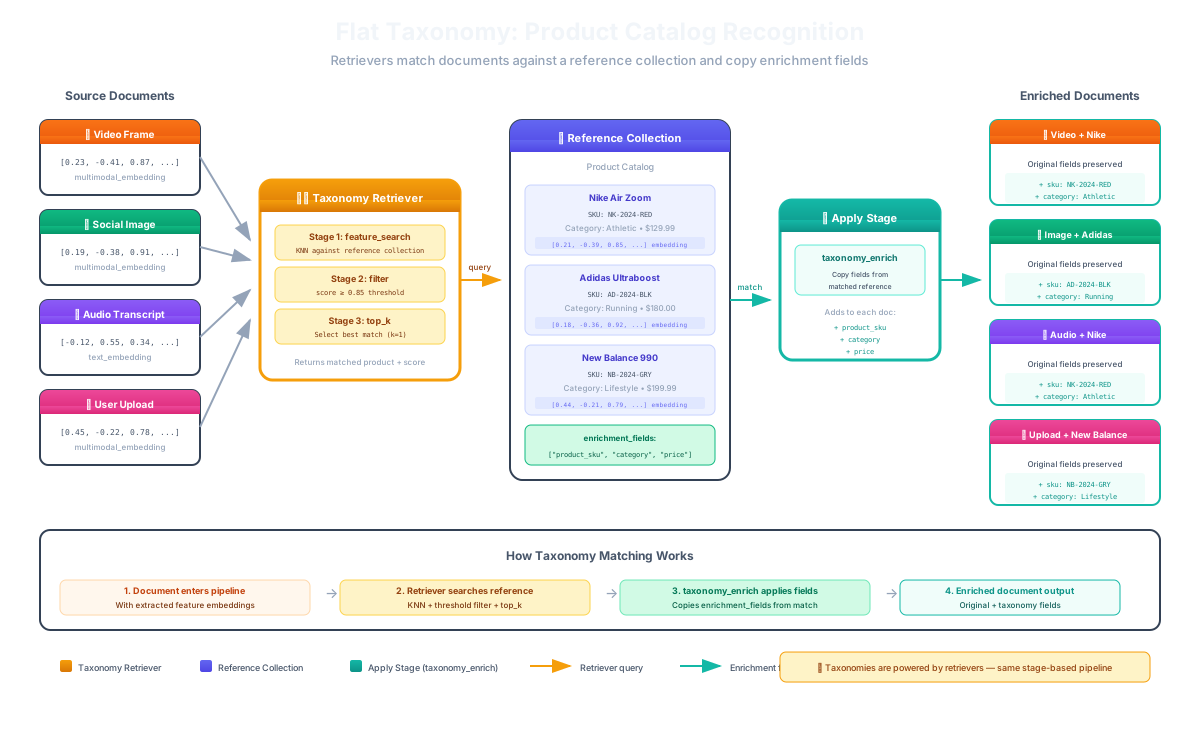
{
  "taxonomy_name": "product_tags",
  "config": {
    "taxonomy_type": "flat",
    "retriever_id": "ret_clip_v1",
    "input_mappings": [{
      "input_key": "image_vector",
      "source_type": "vector",
      "path": "features.clip"
    }],
    "source_collection": {
      "collection_id": "col_product_tags",
      "enrichment_fields": [
        { "field": "category", "mode": "replace" },
        { "field": "tags", "mode": "append" }
      ]
    }
  }
}
Single-level classification. Each document matched to one category with enrichment fields copied directly.
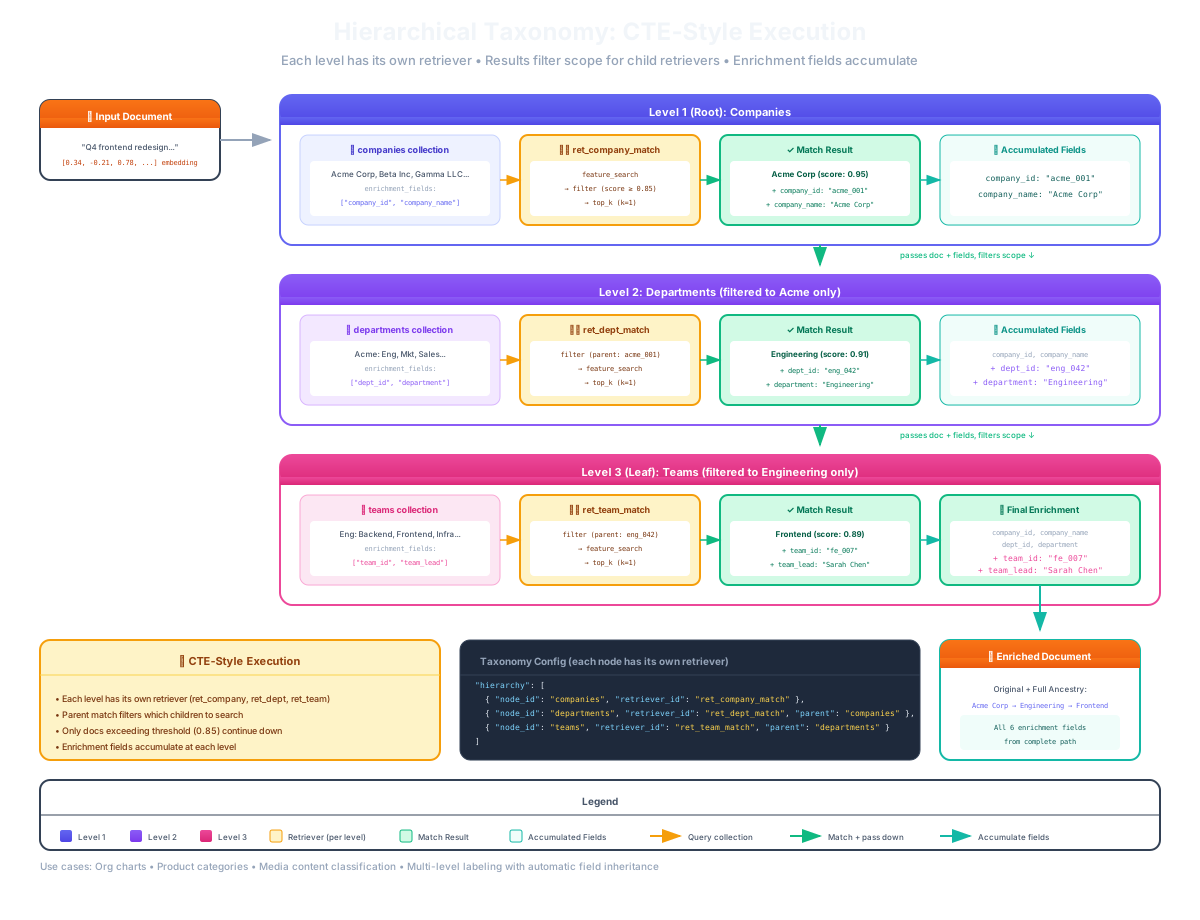
{
  "taxonomy_name": "content_categories",
  "config": {
    "taxonomy_type": "hierarchical",
    "retriever_id": "ret_e5_multilingual",
    "hierarchical_nodes": [
      { "collection_id": "col_tier1",
        "label": "Tier 1 (Top-level)" },
      { "collection_id": "col_tier2",
        "parent_collection_id": "col_tier1",
        "label": "Tier 2 (Subcategories)" },
      { "collection_id": "col_tier3",
        "parent_collection_id": "col_tier2",
        "label": "Tier 3 (Specific)" }
    ]
  }
}
Multi-level classification with property inheritance. Documents enriched at the deepest matching tier, inheriting parent categories.
Taxonomies vs. Ontologies vs. Clusters
Choose the right content organization approach for your use case
Taxonomies
Classify content into predefined categories. Enrich with structured metadata using established systems.
e.g., product types, content topics, IAB 3.0
Ontologies
Model entity relationships. Traverse connections between people, brands, locations across modalities.
e.g., "Player → Team → Sponsor"
Clusters
Automatically group similar content. Discover patterns without predefined structure.
e.g., "Similar scenes"
Use them together: Taxonomies classify, Ontologies connect, and Clusters group—making your multimodal data searchable and intelligent.
Video, Image, Audio, and Text Classification
Apply the same taxonomy to classify content across every modality
Video
Classify video frames by visual content and transcript topics
Images
Categorize product photos, logos, scenes into taxonomy labels
Audio
Tag audio and transcripts by topic, genre, and subject matter
Documents
Classify articles, PDFs, and text by content categories
The Power: Any content type is classified through the same taxonomy. A product review video, its thumbnail image, and its transcript text all receive the same category: "Technology > Consumer Electronics" classification.
"Taxonomies reduced our manual content tagging from 40 hours/week to zero. Classification accuracy exceeded 90% across all modalities."
Media platform processing 2M+ assets monthly
Frequently Asked Questions About Content Taxonomies
What is a multimodal taxonomy?
A multimodal taxonomy is a classification system that categorizes content across multiple modalities—video, images, audio, and text—into structured categories. Unlike traditional tagging which works on a single content type, multimodal taxonomies apply the same category hierarchy to any content format, enabling consistent metadata enrichment across your entire content library.
What is the difference between flat and hierarchical taxonomies?
Flat taxonomies assign content to a single level of categories (e.g., "Sports", "Technology", "Fashion"). Hierarchical taxonomies organize categories into parent-child tiers (e.g., "Sports > Basketball > NBA"), allowing classification at multiple levels of specificity with property inheritance from parent to child categories.
How do taxonomies differ from ontologies and clusters?
Taxonomies classify content into predefined categories (e.g., product types, content topics). Ontologies model entity relationships and enable multi-hop reasoning across connected entities. Clusters automatically group similar content without predefined structure. They can be used together: taxonomies classify, ontologies connect, and clusters group.
Can taxonomies classify video, images, and audio content?
Yes. Mixpeek taxonomies classify content across all four modalities—video, images, audio, and documents—using the same taxonomy structure. A product review video, its thumbnail image, and its transcript text all receive the same category classification, ensuring consistent metadata enrichment regardless of content format.
Ready to Classify Your Content?
Start enriching your multimodal content with structured taxonomy metadata. Use pre-built taxonomies or bring your own category structures.