Why Scene Segmentation Comes First
Before an AI agent can search a video, the video must be decomposed into segments. A raw video file is a continuous stream of pixel arrays and audio samples -- there are no natural boundaries, no chapters, no "scenes" unless someone creates them. An hour-long video at 30fps contains 108,000 frames. Running an embedding model on every frame is computationally wasteful and produces redundant vectors, since adjacent frames in the same scene are nearly identical.
Scene segmentation solves this by splitting a video into semantically meaningful chunks: shots, scenes, or segments that each represent a coherent visual or narrative unit. Once a video is segmented, downstream tasks become tractable:
This guide covers the algorithms that make scene segmentation work, from simple histogram differences to adaptive threshold methods used in production systems.
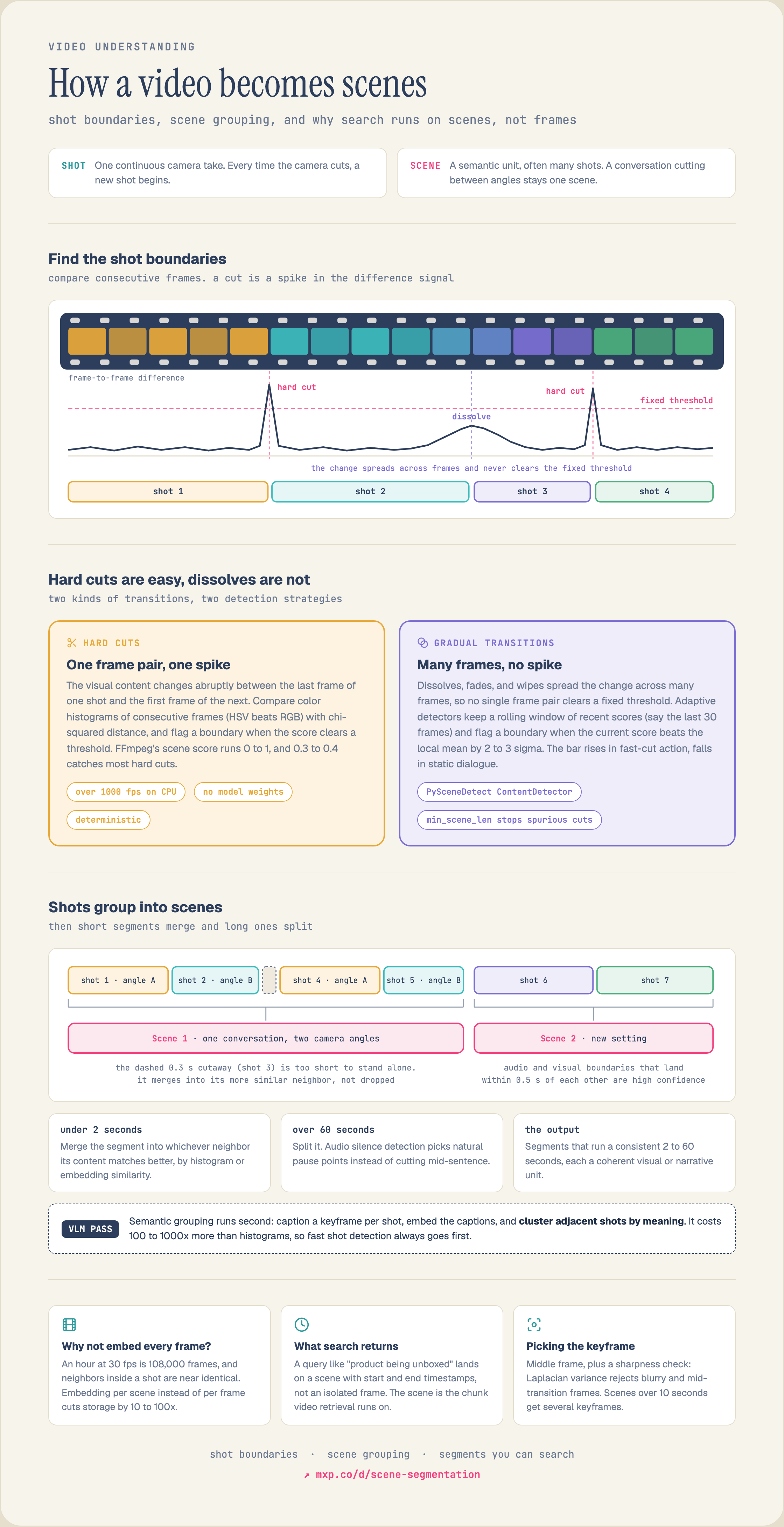
See the full diagram →
Shot Detection vs. Scene Detection
These terms are often used interchangeably, but they describe different levels of granularity:
A shot is a single continuous camera take. Every time the camera cuts, a new shot begins. Shot boundaries are relatively easy to detect because the visual content changes abruptly between the last frame of one shot and the first frame of the next.
A scene is a semantic unit that may contain multiple shots. A conversation between two people might cut back and forth between camera angles (multiple shots) but remain a single scene because the content, setting, and narrative thread are continuous.
Most production systems start with shot boundary detection and then optionally group shots into scenes using higher-level features. This guide covers both.
Approach 1: Pixel-Level Histogram Differences
The oldest and simplest shot detection method compares color histograms between consecutive frames. The algorithm:
1. Convert each frame to a color space (HSV works better than RGB because it separates luminance from chrominance) 2. Compute a histogram for each frame -- bin pixel values into buckets for each channel 3. Calculate the distance between consecutive histograms using chi-squared distance, histogram intersection, or Bhattacharyya distance 4. When the distance exceeds a threshold, declare a shot boundary
Chi-squared distance between histograms H1 and H2:
d(H1, H2) = sum( (H1[i] - H2[i])^2 / (H1[i] + H2[i]) )
This works well for hard cuts (instantaneous transitions between shots) but struggles with gradual transitions like dissolves, wipes, and fades, where the change spreads across many frames.
Strengths: Fast (runs at >1000fps on CPU), no model weights needed, deterministic.
Weaknesses: Sensitive to threshold selection. A single global threshold fails on videos with both static dialogue scenes (low inter-frame difference) and fast-cut action sequences (high inter-frame difference). Gradual transitions produce no single frame pair with a large enough difference to trigger detection.
The key insight of adaptive methods: the "right" threshold depends on the local characteristics of the video. A static talking-head has very low frame-to-frame variation, so even a small spike indicates a transition. An action sequence has high variation throughout, so only a very large spike indicates a real cut rather than just camera motion.
The algorithm used by tools like PySceneDetect's ContentDetector and FFmpeg's scene filter:
1. Compute a content score for each frame pair (using pixel differences, edge detection, or a lightweight CNN) 2. Maintain a rolling window of recent scores (e.g., the last 30 frames) 3. Calculate the local mean and standard deviation of scores within the window 4. Declare a boundary when the current score exceeds the local mean by a configurable number of standard deviations (typically 2--3 sigma)
This adapts naturally to different content types within the same video. The threshold is effectively higher during action sequences and lower during static scenes.
FFmpeg's
Strengths: Fast (runs at >1000fps on CPU), no model weights needed, deterministic.
Weaknesses: Sensitive to threshold selection. A single global threshold fails on videos with both static dialogue scenes (low inter-frame difference) and fast-cut action sequences (high inter-frame difference). Gradual transitions produce no single frame pair with a large enough difference to trigger detection.
Approach 2: Content-Based Adaptive Thresholds
The key insight of adaptive methods: the "right" threshold depends on the local characteristics of the video. A static talking-head has very low frame-to-frame variation, so even a small spike indicates a transition. An action sequence has high variation throughout, so only a very large spike indicates a real cut rather than just camera motion.
The algorithm used by tools like PySceneDetect's ContentDetector and FFmpeg's scene filter:
1. Compute a content score for each frame pair (using pixel differences, edge detection, or a lightweight CNN) 2. Maintain a rolling window of recent scores (e.g., the last 30 frames) 3. Calculate the local mean and standard deviation of scores within the window 4. Declare a boundary when the current score exceeds the local mean by a configurable number of standard deviations (typically 2--3 sigma)
This adapts naturally to different content types within the same video. The threshold is effectively higher during action sequences and lower during static scenes.
FFmpeg Scene Detection
FFmpeg's
select filter includes a scene change detection mode:ffmpeg -i input.mp4 -filter:v "select='gt(scene,0.4)'" -vsync vfr frames/frame_%04d.jpg
The
PySceneDetect's ContentDetector uses a weighted combination of content metrics (hue, saturation, luminance, edges) with an adaptive threshold:
scene value ranges from 0 to 1, where 1 means every pixel changed. A threshold of 0.3--0.4 catches most hard cuts. But this is a global threshold -- it does not adapt to content.PySceneDetect
PySceneDetect's ContentDetector uses a weighted combination of content metrics (hue, saturation, luminance, edges) with an adaptive threshold:
from scenedetect import detect, ContentDetector
scenes = detect("video.mp4", ContentDetector(threshold=27.0, min_scene_len=15))
The
Raw shot detection often produces segments that are too short to be useful. A camera flash, a brief cutaway, or a single reaction shot might be detected as its own segment, producing a 0.3-second clip that has no standalone meaning.
Minimum segment merging is a post-processing step:
1. Run shot boundary detection to get an initial list of segments 2. For each segment shorter than a minimum duration (e.g., 2 seconds): - Compute similarity between the short segment and its neighbors (using histogram similarity, embedding distance, or both) - Merge the short segment with the more similar neighbor 3. Repeat until all segments meet the minimum duration
This is more sophisticated than simply discarding short segments, because it preserves the content by incorporating it into the neighboring segment where it fits best. A brief reaction shot gets merged into the conversation scene it belongs to, rather than being dropped entirely.
The inverse problem also matters: some videos have long stretches without visual transitions (a lecture, a surveillance camera, a slow pan). Left unmerged, these become single segments spanning many minutes, which defeats the purpose of segmentation.
A maximum duration cap (e.g., 60 seconds) forces long segments to be split. The split points can be chosen by:
Fixed intervals -- simplest, but may split mid-sentence
Audio silence detection -- split at natural pauses
Embedding distance peaks -- split where visual content changes most within the segment, even if it is below the shot boundary threshold
Production pipelines typically apply both minimum and maximum duration constraints, creating segments that are consistently 2--60 seconds long.
Visual-only scene detection misses a major signal: audio. In many video types, audio provides stronger scene boundaries than visual content:
A news broadcast has the same studio background throughout (no visual transition) but clearly distinct stories separated by anchor transitions, music stings, and topic changes
A podcast has almost no visual variation but distinct topic segments separated by verbal cues and silence
A movie scene may have continuous visual flow but a soundtrack change that signals a new narrative beat
Audio-visual alignment combines both signals:
1. Audio scene detection: Detect silence gaps, music changes, and speech-to-non-speech transitions using energy-based VAD (voice activity detection) or a model like Silero VAD 2. Visual scene detection: Run adaptive threshold detection on the visual stream 3. Fusion: Combine both signals. When audio and visual boundaries coincide (within a tolerance window of ~0.5 seconds), confidence is high. When they disagree, use the modality that is more informative for the content type
Audio silence detection is particularly valuable for splitting long segments at natural pause points. This produces segments that align with how humans perceive scene changes -- not just visual cuts, but narrative and topical boundaries.
The approaches above use low-level visual and audio features. Semantic grouping uses vision-language models (VLMs) to understand what is happening in each segment, then clusters shots into scenes based on meaning.
The process:
1. Run shot boundary detection to get initial segments 2. Extract a keyframe from each segment 3. Generate a caption or description for each keyframe using a VLM (Florence-2, Qwen3-VL, InternVL3) 4. Compute text embeddings for each caption 5. Cluster adjacent segments by caption similarity -- segments with similar descriptions are grouped into scenes 6. Alternatively, use the VLM to directly answer: "Do these two keyframes belong to the same scene?"
This produces scene boundaries that align with narrative structure rather than camera edits. Two shots of different people in the same meeting room get grouped into one scene. A montage of different locations with the same narrative voiceover might be grouped or split depending on the semantic similarity of the descriptions.
Cost-accuracy tradeoff: VLM-based grouping is 100--1000x more expensive than histogram methods because it requires model inference on every keyframe. It is typically used as a second pass after fast shot detection has reduced the frame count by 10--100x.
Once segments are defined, each needs one or more representative keyframes for embedding extraction. The choice matters: a bad keyframe (blurry, mid-transition, unrepresentative) produces bad embeddings and bad search results.
Middle frame: Take the frame at the temporal midpoint of each segment. Simple and surprisingly effective -- the midpoint is usually far from transition boundaries and representative of the segment's content.
Maximum sharpness: Compute Laplacian variance (a measure of image sharpness) for candidate frames and select the sharpest one. This avoids motion blur and out-of-focus frames.
min_scene_len parameter prevents detecting spurious cuts within very short intervals -- a critical production parameter that avoids fragmenting video into unusably small segments.Approach 3: Minimum Segment Merging
Raw shot detection often produces segments that are too short to be useful. A camera flash, a brief cutaway, or a single reaction shot might be detected as its own segment, producing a 0.3-second clip that has no standalone meaning.
Minimum segment merging is a post-processing step:
1. Run shot boundary detection to get an initial list of segments 2. For each segment shorter than a minimum duration (e.g., 2 seconds): - Compute similarity between the short segment and its neighbors (using histogram similarity, embedding distance, or both) - Merge the short segment with the more similar neighbor 3. Repeat until all segments meet the minimum duration
This is more sophisticated than simply discarding short segments, because it preserves the content by incorporating it into the neighboring segment where it fits best. A brief reaction shot gets merged into the conversation scene it belongs to, rather than being dropped entirely.
Maximum Segment Duration
The inverse problem also matters: some videos have long stretches without visual transitions (a lecture, a surveillance camera, a slow pan). Left unmerged, these become single segments spanning many minutes, which defeats the purpose of segmentation.
A maximum duration cap (e.g., 60 seconds) forces long segments to be split. The split points can be chosen by:
Production pipelines typically apply both minimum and maximum duration constraints, creating segments that are consistently 2--60 seconds long.
Approach 4: Audio-Visual Alignment
Visual-only scene detection misses a major signal: audio. In many video types, audio provides stronger scene boundaries than visual content:
Audio-visual alignment combines both signals:
1. Audio scene detection: Detect silence gaps, music changes, and speech-to-non-speech transitions using energy-based VAD (voice activity detection) or a model like Silero VAD 2. Visual scene detection: Run adaptive threshold detection on the visual stream 3. Fusion: Combine both signals. When audio and visual boundaries coincide (within a tolerance window of ~0.5 seconds), confidence is high. When they disagree, use the modality that is more informative for the content type
Audio silence detection is particularly valuable for splitting long segments at natural pause points. This produces segments that align with how humans perceive scene changes -- not just visual cuts, but narrative and topical boundaries.
Approach 5: Semantic Scene Grouping with Vision-Language Models
The approaches above use low-level visual and audio features. Semantic grouping uses vision-language models (VLMs) to understand what is happening in each segment, then clusters shots into scenes based on meaning.
The process:
1. Run shot boundary detection to get initial segments 2. Extract a keyframe from each segment 3. Generate a caption or description for each keyframe using a VLM (Florence-2, Qwen3-VL, InternVL3) 4. Compute text embeddings for each caption 5. Cluster adjacent segments by caption similarity -- segments with similar descriptions are grouped into scenes 6. Alternatively, use the VLM to directly answer: "Do these two keyframes belong to the same scene?"
This produces scene boundaries that align with narrative structure rather than camera edits. Two shots of different people in the same meeting room get grouped into one scene. A montage of different locations with the same narrative voiceover might be grouped or split depending on the semantic similarity of the descriptions.
Cost-accuracy tradeoff: VLM-based grouping is 100--1000x more expensive than histogram methods because it requires model inference on every keyframe. It is typically used as a second pass after fast shot detection has reduced the frame count by 10--100x.
Keyframe Selection Strategies
Once segments are defined, each needs one or more representative keyframes for embedding extraction. The choice matters: a bad keyframe (blurry, mid-transition, unrepresentative) produces bad embeddings and bad search results.
Middle frame: Take the frame at the temporal midpoint of each segment. Simple and surprisingly effective -- the midpoint is usually far from transition boundaries and representative of the segment's content.
Maximum sharpness: Compute Laplacian variance (a measure of image sharpness) for candidate frames and select the sharpest one. This avoids motion blur and out-of-focus frames.
import cv2
import numpy as np

def laplacian_variance(frame):
    gray = cv2.cvtColor(frame, cv2.COLOR_BGR2GRAY)
    return cv2.Laplacian(gray, cv2.CV_64F).var()
Maximum information: Compute the entropy of each frame's histogram and select the frame with the highest entropy. High-entropy frames contain more visual detail and produce more discriminative embeddings.
Multiple keyframes: For segments longer than a threshold (e.g., >10 seconds), extract multiple keyframes at regular intervals. This captures visual variation within the segment -- a panning shot reveals different content at different points.
In practice, middle-frame selection with a sharpness filter (reject frames below a Laplacian variance threshold and fall back to the next candidate) provides the best balance of quality and simplicity.
After segmentation and keyframe selection, the question is how to embed each segment for search:
Frame-level embeddings: Embed each keyframe independently with a vision model (CLIP, SigLIP, DINOv2). Search returns individual frames ranked by similarity. This is simple and works well for visual similarity queries ("find frames that look like this image").
Segment-level embeddings: Aggregate keyframe embeddings within a segment. Options include mean pooling (average the keyframe embeddings), attention pooling (learn weights for each keyframe), or concatenation with a projection layer.
Segment-level embeddings capture temporal context that individual frames miss. A segment embedding for a "product unboxing" scene encodes the full sequence -- hands opening a box, revealing the product, showing accessories -- not just one freeze frame.
Hybrid approach: Index both. Use segment-level embeddings for coarse retrieval (find relevant segments) and frame-level embeddings for fine-grained retrieval within a segment (find the exact moment). This maps naturally to a multi-stage retrieval pipeline: stage 1 retrieves candidate segments, stage 2 ranks frames within those segments.
Video segmentation is embarrassingly parallel at the video level -- each video can be processed independently. Within a single video, frame extraction is sequential (frames must be decoded in order), but feature computation on extracted frames can be parallelized across GPUs.
Production pipelines use a three-stage architecture:
1. Decode -- FFmpeg extracts frames at the target sampling rate (1--5 fps for scene detection, full fps for precision work) 2. Detect -- Scene detection runs on CPU (histogram methods) or GPU (learned methods) 3. Extract -- Feature extraction runs on GPU for each selected keyframe
Static videos (surveillance, webcams): Audio-based splitting or fixed-interval chunking is more useful than visual scene detection, since the visual content barely changes
Rapid cuts (music videos, trailers): Aggressive minimum segment merging prevents fragmentation into hundreds of sub-second clips
Live streams: Scene detection must run in a streaming fashion, processing frames as they arrive rather than requiring the full video upfront. Sliding window approaches work; global methods that need the full video do not
Variable framerate: Normalize to a fixed framerate before scene detection, or use timestamp-based (not frame-index-based) thresholds
How do you know your scene segmentation is good? Common evaluation metrics:
Precision: What fraction of detected boundaries are real boundaries?
Recall: What fraction of real boundaries were detected?
F1 score: Harmonic mean of precision and recall
Coverage: Average IoU (intersection over union) between detected segments and ground-truth segments
A boundary is considered "correct" if it falls within a tolerance window of the ground-truth boundary (typically +/- 1 second for scene detection, +/- 0.5 seconds for shot detection).
Mixpeek's extraction pipeline segments video by scene when the collection asks for it:
1. Upload video to a bucket as an object, then trigger the collection that reads the bucket 2. Scene detection splits the video when split_method is "scene". scene_detection_threshold sets how readily it cuts, and max_segment_duration subdivides a long scene 3. Thumbnails give each segment a preview frame 4. Feature extraction runs per segment: a multimodal visual embedding and, when switched on, a Whisper transcript, OCR text and a generated description 5. Indexing stores each segment with its timestamp range and extracted features in a collection
Multiple keyframes: For segments longer than a threshold (e.g., >10 seconds), extract multiple keyframes at regular intervals. This captures visual variation within the segment -- a panning shot reveals different content at different points.
In practice, middle-frame selection with a sharpness filter (reject frames below a Laplacian variance threshold and fall back to the next candidate) provides the best balance of quality and simplicity.
Segment-Level vs. Frame-Level Embeddings
After segmentation and keyframe selection, the question is how to embed each segment for search:
Frame-level embeddings: Embed each keyframe independently with a vision model (CLIP, SigLIP, DINOv2). Search returns individual frames ranked by similarity. This is simple and works well for visual similarity queries ("find frames that look like this image").
Segment-level embeddings: Aggregate keyframe embeddings within a segment. Options include mean pooling (average the keyframe embeddings), attention pooling (learn weights for each keyframe), or concatenation with a projection layer.
Segment-level embeddings capture temporal context that individual frames miss. A segment embedding for a "product unboxing" scene encodes the full sequence -- hands opening a box, revealing the product, showing accessories -- not just one freeze frame.
Hybrid approach: Index both. Use segment-level embeddings for coarse retrieval (find relevant segments) and frame-level embeddings for fine-grained retrieval within a segment (find the exact moment). This maps naturally to a multi-stage retrieval pipeline: stage 1 retrieves candidate segments, stage 2 ranks frames within those segments.
Production Considerations
Parallelism and Throughput
Video segmentation is embarrassingly parallel at the video level -- each video can be processed independently. Within a single video, frame extraction is sequential (frames must be decoded in order), but feature computation on extracted frames can be parallelized across GPUs.
Production pipelines use a three-stage architecture:
1. Decode -- FFmpeg extracts frames at the target sampling rate (1--5 fps for scene detection, full fps for precision work) 2. Detect -- Scene detection runs on CPU (histogram methods) or GPU (learned methods) 3. Extract -- Feature extraction runs on GPU for each selected keyframe
Handling Edge Cases
Quality Metrics
How do you know your scene segmentation is good? Common evaluation metrics:
A boundary is considered "correct" if it falls within a tolerance window of the ground-truth boundary (typically +/- 1 second for scene detection, +/- 0.5 seconds for shot detection).
Building This with Mixpeek
Mixpeek's extraction pipeline segments video by scene when the collection asks for it:
1. Upload video to a bucket as an object, then trigger the collection that reads the bucket 2. Scene detection splits the video when split_method is "scene". scene_detection_threshold sets how readily it cuts, and max_segment_duration subdivides a long scene 3. Thumbnails give each segment a preview frame 4. Feature extraction runs per segment: a multimodal visual embedding and, when switched on, a Whisper transcript, OCR text and a generated description 5. Indexing stores each segment with its timestamp range and extracted features in a collection
from mixpeek import Mixpeek

mx = Mixpeek(api_key="YOUR_API_KEY", namespace="my-namespace")

bucket = mx.buckets.create(
    bucket_name="videos",
    bucket_schema={"properties": {"video": {"type": "video"}}},
)

# Scene segmentation is the collection's split setting. Each scene becomes a
# segment with its time range, a visual embedding, a transcript and a
# generated description.
collection = mx.collections.create(
    collection_name="scenes",
    source={"type": "bucket", "bucket_ids": [bucket["bucket_id"]]},
    feature_extractor={
        "feature_extractor_name": "multimodal_extractor",
        "version": "v1",
        "parameters": {
            "split_method": "scene",
            "scene_detection_threshold": 0.5,
            "max_segment_duration": 30,
            "run_transcription": True,
            "run_video_description": True,
        },
    },
)

mx.buckets.upload(
    bucket["bucket_id"],
    blobs=[{"property": "video", "type": "video", "data": "https://storage.example.com/video.mp4"}],
)
mx.collections.trigger(collection["collection_id"])

# Search returns segments with timestamps
results = mx.retrievers.execute("my-retriever", inputs={"query": "product being unboxed"})

for result in results["documents"]:
    print(f"{result['start_time']}s - {result['end_time']}s: {result['score']}")