The Decision Everyone Skips
Most teams building video search make two decisions carefully -- how to cut video into segments, and which embedding model to run -- and make the decision between them by accident. That middle decision is frame sampling: given a segment of video, how many frames do you actually push through the embedding model, and which ones?
It looks trivial. It is not. Frame sampling is the single biggest lever on the cost and recall of a video search system, and the default ("grab one frame per second" or "grab the middle frame") quietly throws away recall on exactly the queries that matter.
This guide assumes you have already split video into segments. (If you have not, start with Video Scene Segmentation.) The question here is what happens inside each segment, before the embedding model runs.
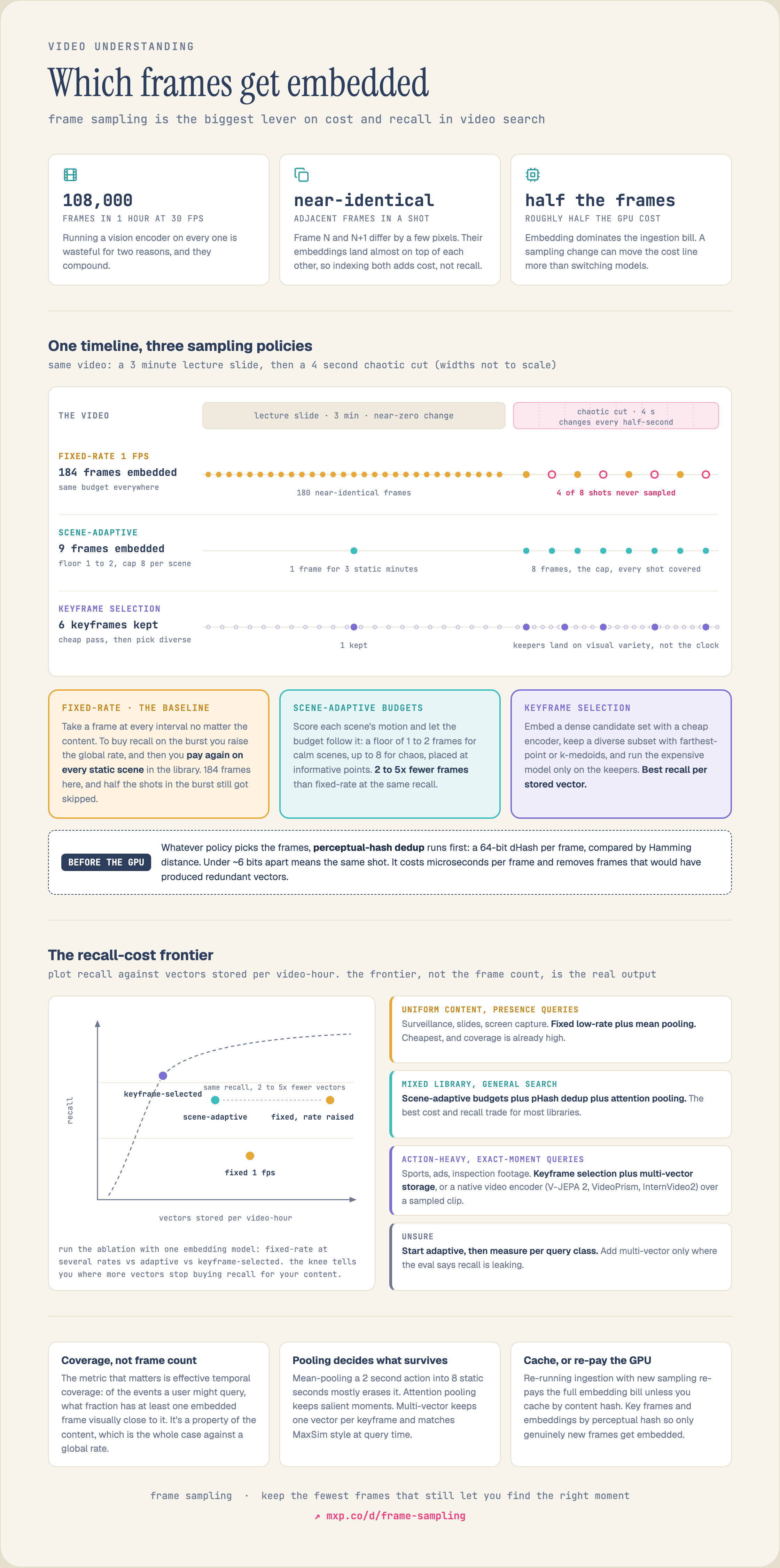
See the full diagram →
Why Sampling Exists At All
An hour of video at 30fps is 108,000 frames. Running a vision encoder on every frame is wasteful for two reasons, and they compound.
First, adjacent frames are nearly identical. Within a single shot, frame N and frame N+1 differ by a few pixels of motion. Their embeddings land almost on top of each other in vector space. Indexing both does not add recall -- it adds storage, query-time fan-out, and duplicate results that the agent then has to dedupe.
Second, embedding is the expensive step. A GPU forward pass through a ViT-L or a video encoder dominates the ingestion bill. Halving the frames you embed roughly halves the GPU cost of the whole pipeline. This is why a sampling change can move the cost line more than switching models.
So sampling is a compression problem with a recall constraint: keep the fewest frames that still let you find the right moment.
The Quantity That Actually Matters: Effective Coverage
Before choosing an algorithm, define what you are optimizing. The naive metric is "frames per second sampled." The useful metric is effective temporal coverage: across the events a user might query, what fraction is represented by at least one embedded frame that is visually close to that event?
A talking-head lecture has near-zero visual change for minutes. One frame every 10 seconds gives near-perfect coverage. A sports highlight reel changes completely every half-second; one frame per second misses most of the action. Coverage is a property of the *content*, not a global constant -- which is the whole argument against fixed-rate sampling.
Approach 1: Fixed-Rate (FPS) Sampling
The baseline. Pick a rate -- say 1fps -- and sample one frame at each interval regardless of content.
import cv2

def sample_fixed_fps(path, target_fps=1.0):
    cap = cv2.VideoCapture(path)
    src_fps = cap.get(cv2.CAP_PROP_FPS)
    stride = max(1, round(src_fps / target_fps))
    frames, idx = [], 0
    while True:
        ok, frame = cap.read()
        if not ok:
            break
        if idx % stride == 0:
            frames.append((idx / src_fps, frame))  # (timestamp_sec, frame)
        idx += 1
    cap.release()
    return frames
Strengths: dead simple, deterministic, trivial to reason about cost (cost scales linearly with rate).
Weaknesses: it spends the same budget on a static scene and a fast-cut sequence. To get acceptable recall on the action sequence you raise the global rate, which then over-samples every static scene in the library. You pay everywhere for the recall you needed in a few places. Fixed-rate sampling is the right default only when your content is visually uniform (surveillance with steady scenes, screen recordings).
The fix is to make the budget follow the content. You already have segment boundaries from scene detection; allocate frames per segment in proportion to how much is happening inside it.
A practical allocation rule:
1. For each segment, compute a motion or content score (mean absolute inter-frame difference, optical-flow magnitude, or the same content score your scene detector produced). 2. Convert the score to a frame budget: a low-motion segment gets a floor (1--2 frames), a high-motion segment gets more, capped at a ceiling. 3. Place the budgeted frames at the most informative points, not at fixed intervals.
Weaknesses: it spends the same budget on a static scene and a fast-cut sequence. To get acceptable recall on the action sequence you raise the global rate, which then over-samples every static scene in the library. You pay everywhere for the recall you needed in a few places. Fixed-rate sampling is the right default only when your content is visually uniform (surveillance with steady scenes, screen recordings).
Approach 2: Scene-Adaptive Frame Budgets
The fix is to make the budget follow the content. You already have segment boundaries from scene detection; allocate frames per segment in proportion to how much is happening inside it.
A practical allocation rule:
1. For each segment, compute a motion or content score (mean absolute inter-frame difference, optical-flow magnitude, or the same content score your scene detector produced). 2. Convert the score to a frame budget: a low-motion segment gets a floor (1--2 frames), a high-motion segment gets more, capped at a ceiling. 3. Place the budgeted frames at the most informative points, not at fixed intervals.
def budget_for_segment(motion_score, lo=1, hi=8, k=0.5):
    # motion_score normalized to roughly [0, 1]
    import math
    return max(lo, min(hi, round(lo + k * hi * math.sqrt(motion_score))))
This concentrates compute where recall is at risk. A 3-minute lecture slide gets one frame; a 4-second chaotic cut gets eight. Total frames embedded can drop 2--5x versus fixed-rate at the *same* recall, because you stop paying for redundant static frames.
The square-root shaping matters: motion score and required frames are not linear. Doubling the motion does not require double the frames, because much of the extra motion is still within-event variation that a single good frame already represents.
Even within a budgeted set, you can land on near-duplicates -- two frames from the same held shot. Perceptual hashing removes them cheaply, before the expensive embedding step.
Unlike a cryptographic hash, a perceptual hash (pHash, dHash) maps visually similar images to similar bit strings, so near-duplicates have a small Hamming distance.
The square-root shaping matters: motion score and required frames are not linear. Doubling the motion does not require double the frames, because much of the extra motion is still within-event variation that a single good frame already represents.
Approach 3: Perceptual-Hash Deduplication
Even within a budgeted set, you can land on near-duplicates -- two frames from the same held shot. Perceptual hashing removes them cheaply, before the expensive embedding step.
Unlike a cryptographic hash, a perceptual hash (pHash, dHash) maps visually similar images to similar bit strings, so near-duplicates have a small Hamming distance.
import cv2, numpy as np

def dhash(frame, size=8):
    g = cv2.cvtColor(frame, cv2.COLOR_BGR2GRAY)
    g = cv2.resize(g, (size + 1, size))
    diff = g[:, 1:] > g[:, :-1]      # each pixel brighter than its left neighbor?
    bits = diff.flatten()
    return sum(int(b) << i for i, b in enumerate(bits))  # 64-bit hash

def hamming(a, b):
    return bin(a ^ b).count("1")

def dedupe(frames, max_dist=6):
    kept, hashes = [], []
    for ts, f in frames:
        h = dhash(f)
        if all(hamming(h, k) > max_dist for k in hashes):
            kept.append((ts, f)); hashes.append(h)
    return kept
A Hamming distance under ~6 bits (out of 64) means "the same shot." Running dedup before embedding is pure win: it is a few microseconds per frame and it removes frames that would have produced redundant vectors. The one caution is gradual transitions -- a slow dissolve produces a chain of frames each close to its neighbor but far from the ends, so a strictly greedy filter can keep too many. Cap dedup per segment rather than globally.
The most accurate method spends a little of the embedding budget to spend the rest well. You embed a dense candidate set with a cheap encoder (or a lightweight feature), then *select* a diverse, representative subset to keep.
This is a clustering / coverage problem. Two standard formulations:
K-medoids on frame embeddings. Embed candidate frames, cluster them, and keep the medoid (the most central real frame) of each cluster. The medoids are the frames that best summarize the visual variety of the segment.
Greedy farthest-point sampling when you want guaranteed diversity and a fixed budget:
Approach 4: Embedding-Space Keyframe Selection
The most accurate method spends a little of the embedding budget to spend the rest well. You embed a dense candidate set with a cheap encoder (or a lightweight feature), then *select* a diverse, representative subset to keep.
This is a clustering / coverage problem. Two standard formulations:
K-medoids on frame embeddings. Embed candidate frames, cluster them, and keep the medoid (the most central real frame) of each cluster. The medoids are the frames that best summarize the visual variety of the segment.
Greedy farthest-point sampling when you want guaranteed diversity and a fixed budget:
import numpy as np

def farthest_point_keyframes(embeddings, k):
    # embeddings: (n, d) L2-normalized candidate-frame vectors
    n = len(embeddings)
    selected = [0]
    dists = 1 - embeddings @ embeddings[0]      # cosine distance to first pick
    while len(selected) < min(k, n):
        nxt = int(np.argmax(dists))
        selected.append(nxt)
        dists = np.minimum(dists, 1 - embeddings @ embeddings[nxt])
    return sorted(selected)
Each new keyframe is the candidate maximally far from everything already chosen, so the kept set covers the segment's visual range with no redundancy. This beats fixed-rate and budgeted sampling on recall per stored vector, at the cost of an extra cheap embedding pass.
The practical pattern: cheap dense candidates → farthest-point or k-medoids selection → expensive high-quality embedding only on the selected keyframes.
Sampling decides which frames you embed. You still have to decide how those per-frame vectors become what you store and search. Three options, in increasing fidelity and cost:
Mean pooling. Average the frame vectors into one segment vector. Cheap, one vector per segment, and it works for "is this thing present in the segment" queries. It destroys temporal order and washes out brief events -- a 2-second action averaged with 8 seconds of static background largely disappears.
Attention or max pooling. Weight frames by informativeness (or keep the per-dimension max). Preserves salient moments better than the mean while still producing one vector. A reasonable middle ground.
Multi-vector / late interaction. Keep one vector per keyframe and match at query time with a MaxSim-style operator (the same idea as ColPali and other late-interaction retrievers -- see Late Interaction Retrieval). Highest recall on "find the exact moment" queries because no temporal information is averaged away. The cost is storage and a heavier query operator: keyframe selection (Approach 4) is what keeps the per-segment vector count sane.
Native video encoders. Models like V-JEPA 2, VideoPrism, and InternVideo2 take a clip of frames and output a clip embedding that already encodes temporal structure. Here "sampling" becomes "how many frames do I feed the encoder's context window," and the model does the pooling. This is the cleanest path for motion-heavy queries, because the encoder learned temporal relationships rather than having them averaged out after the fact.
The choice is query-driven. Object-presence and scene-type queries are fine with pooled single vectors. Action, cause-and-effect, and exact-moment queries need either multi-vector storage or a native video encoder.
Put it together as a decision, not a default:
Visually uniform content, presence queries (surveillance, slides, screen capture): fixed low-rate sampling + mean pooling. Cheapest, and coverage is already high.
Mixed content, general search: scene-adaptive budgets + perceptual dedup + attention pooling. The best cost/recall trade for most libraries.
Action-heavy or exact-moment queries (sports, ads, inspection footage): embedding-space keyframe selection + multi-vector storage, or a native video encoder over a sampled clip.
Unsure: start adaptive, then measure per query class and only add multi-vector where the eval says recall is leaking.
Do not tune sampling by eyeballing frame counts. Tune it against retrieval outcomes, broken out by query class:
Recall@k by query class (object, scene, action, exact-moment) -- sampling that looks fine on object queries can be failing action queries.
Temporal IoU between the retrieved time span and the labeled event span -- the honest measure of "did we find the actual moment."
Vectors stored per video-hour -- the storage and query-fan-out cost.
GPU-seconds per video-hour -- the ingestion cost the sampling rate directly controls.
Cost per successful retrieval -- the number that ties it together.
Run the obvious ablation: fixed-rate at several rates versus adaptive versus keyframe-selected, all with the same embedding model. The frontier you plot -- recall against vectors-stored -- is the real output of this work, and it tells you where the knee is for your content.
A subtle, expensive failure mode worth calling out: re-running ingestion with different sampling re-pays the full GPU embedding cost unless your pipeline caches by content hash. If a "reprocess" silently re-embeds frames it already has, sampling experiments get costly fast. Cache decoded frames and embeddings keyed by perceptual hash so a sampling change only embeds the genuinely new frames.
In Managed Mixpeek, sampling is decided by how multimodal_extractor segments a video. Scene splitting gives each shot its own vector, and a segment length cap keeps a long static shot from collapsing into one. Per-scene frame budgets, perceptual-hash dedupe and multi-vector pooling are not settings today, so an ablation across those runs on your own encoder.
The practical pattern: cheap dense candidates → farthest-point or k-medoids selection → expensive high-quality embedding only on the selected keyframes.
From Frames to a Segment Vector: Temporal Pooling
Sampling decides which frames you embed. You still have to decide how those per-frame vectors become what you store and search. Three options, in increasing fidelity and cost:
Mean pooling. Average the frame vectors into one segment vector. Cheap, one vector per segment, and it works for "is this thing present in the segment" queries. It destroys temporal order and washes out brief events -- a 2-second action averaged with 8 seconds of static background largely disappears.
Attention or max pooling. Weight frames by informativeness (or keep the per-dimension max). Preserves salient moments better than the mean while still producing one vector. A reasonable middle ground.
Multi-vector / late interaction. Keep one vector per keyframe and match at query time with a MaxSim-style operator (the same idea as ColPali and other late-interaction retrievers -- see Late Interaction Retrieval). Highest recall on "find the exact moment" queries because no temporal information is averaged away. The cost is storage and a heavier query operator: keyframe selection (Approach 4) is what keeps the per-segment vector count sane.
Native video encoders. Models like V-JEPA 2, VideoPrism, and InternVideo2 take a clip of frames and output a clip embedding that already encodes temporal structure. Here "sampling" becomes "how many frames do I feed the encoder's context window," and the model does the pooling. This is the cleanest path for motion-heavy queries, because the encoder learned temporal relationships rather than having them averaged out after the fact.
The choice is query-driven. Object-presence and scene-type queries are fine with pooled single vectors. Action, cause-and-effect, and exact-moment queries need either multi-vector storage or a native video encoder.
Choosing Along the Recall-Cost Frontier
Put it together as a decision, not a default:
Evaluation: Measure Coverage, Not Just Frame Count
Do not tune sampling by eyeballing frame counts. Tune it against retrieval outcomes, broken out by query class:
Run the obvious ablation: fixed-rate at several rates versus adaptive versus keyframe-selected, all with the same embedding model. The frontier you plot -- recall against vectors-stored -- is the real output of this work, and it tells you where the knee is for your content.
A subtle, expensive failure mode worth calling out: re-running ingestion with different sampling re-pays the full GPU embedding cost unless your pipeline caches by content hash. If a "reprocess" silently re-embeds frames it already has, sampling experiments get costly fast. Cache decoded frames and embeddings keyed by perceptual hash so a sampling change only embeds the genuinely new frames.
Doing This in Mixpeek
In Managed Mixpeek, sampling is decided by how multimodal_extractor segments a video. Scene splitting gives each shot its own vector, and a segment length cap keeps a long static shot from collapsing into one. Per-scene frame budgets, perceptual-hash dedupe and multi-vector pooling are not settings today, so an ablation across those runs on your own encoder.
from mixpeek import Mixpeek

client = Mixpeek(api_key="YOUR_API_KEY", namespace="ads")

bucket = client.buckets.create(
    bucket_name="ad-creatives",
    bucket_schema={"properties": {"creative": {"type": "video"}}},
)

# Scene splitting cuts at shot boundaries. 0.5 is the recommended threshold,
# and a lower value finds more cuts. max_segment_duration subdivides a long
# static shot, and every segment gets one 1408-dimensional multimodal embedding.
client.collections.create(
    collection_name="ad_creatives",
    source={"type": "bucket", "bucket_ids": [bucket["bucket_id"]]},
    feature_extractor={
        "feature_extractor_name": "multimodal_extractor",
        "version": "v1",
        "parameters": {
            "split_method": "scene",
            "scene_detection_threshold": 0.5,
            "max_segment_duration": 8,
            "run_multimodal_embedding": True,
        },
    },
)
If you already run your own video encoder (V-JEPA 2, VideoPrism, InternVideo2) and have done your own sampling and pooling, you do not need managed extraction at all. Bring the vectors to MVS, the Mixpeek Vector Store, and run dense, sparse, and BM25 search on object storage -- so a sampling change on your side never re-pays for extraction on ours. Either way, the search surface is the same MCP tool an agent calls to get back timestamped scenes as grounding context.
Video Scene Segmentation: How AI Decomposes Continuous Video into Searchable Segments
Late Interaction Retrieval
Embedding Quantization and Compression
Multimodal Chunking Strategies
Evaluating Multimodal Retrieval Systems for AI Agents
MVS: Agent-native vector store on object storage