

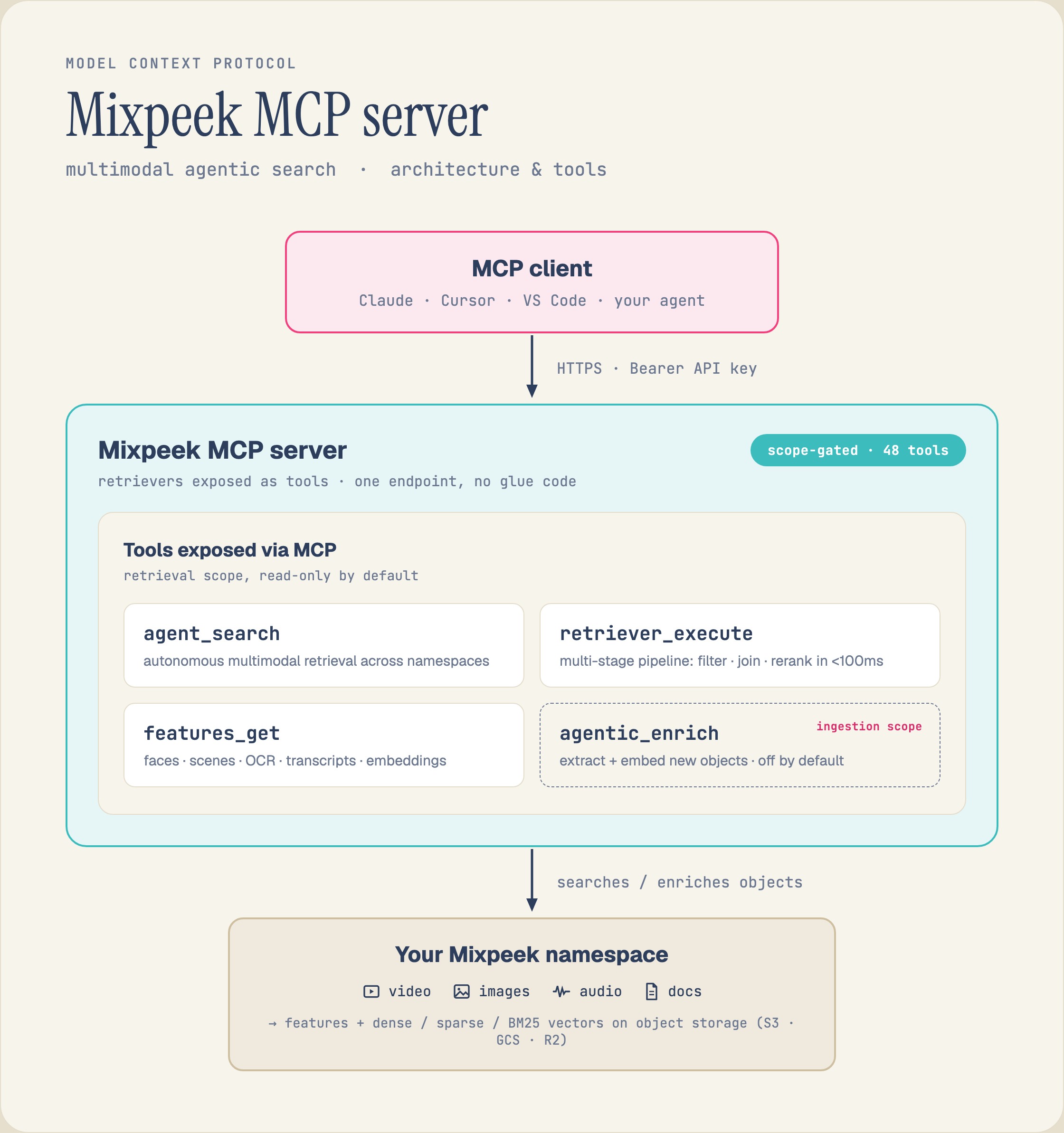
Connect Claude (or any MCP-compatible client) to Mixpeek so it can search video, image, and audio content.

Hosted Server URLs

Mixpeek runs four hosted MCP servers. Each exposes a different subset of tools so you only load what your agent needs.
ScopeURLTools
Fullhttps://mcp.mixpeek.com/full/mcp43 — everything
Ingestionhttps://mcp.mixpeek.com/ingestion/mcp18 — buckets, collections, documents
Retrievalhttps://mcp.mixpeek.com/retrieval/mcp11 — retrievers, agents, search
Adminhttps://mcp.mixpeek.com/admin/mcp14 — namespaces, taxonomies, clusters
For a focused search agent, use the Per-Retriever Server instead. It exposes a single typed search tool generated from your retriever’s input schema.

Setup

Replace YOUR_API_KEY with your key from the Mixpeek dashboard.
Add this to your Claude Desktop config file (claude_desktop_config.json):
{
  "mcpServers": {
    "mixpeek": {
      "url": "https://mcp.mixpeek.com/full/mcp",
      "headers": {
        "Authorization": "Bearer YOUR_API_KEY"
      }
    }
  }
}

Per-Retriever MCP Server

The retriever server is a lightweight MCP server scoped to a single retriever. It reads your retriever’s input_schema at startup and generates a typed search tool whose parameters match exactly.
1

Install

pip install mixpeek-mcp-retriever
2

Run

mixpeek-mcp-retriever \
  --retriever-id ret_xxx \
  --namespace-id ns_xxx \
  --api-key YOUR_API_KEY
3

Connect

Add to your Claude Desktop config:
{
  "mcpServers": {
    "my-search": {
      "command": "mixpeek-mcp-retriever",
      "args": [
        "--retriever-id", "ret_xxx",
        "--namespace-id", "ns_xxx",
        "--api-key", "YOUR_API_KEY"
      ]
    }
  }
}
The retriever server exposes three tools:
ToolDescription
searchExecute the retriever. Parameters are generated from the retriever’s input_schema — field names, types, required flags, enums, and descriptions. Pagination (page, page_size) is added automatically.
describeReturns structured metadata: retriever ID, name, collections, input fields, and stage configuration.
explainReturns a human-readable explanation of the pipeline: what each stage does, in order.
If your retriever’s input_schema has a field named page or page_size, the pagination parameters are automatically renamed to _pagination_page and _pagination_page_size to avoid conflicts.
You can also run the retriever server over HTTP for deployed agents:
mixpeek-mcp-retriever \
  --retriever-id ret_xxx \
  --namespace-id ns_xxx \
  --api-key YOUR_API_KEY \
  --transport http \
  --port 8081
Or configure everything via environment variables (prefixed with RETRIEVER_MCP_):
export RETRIEVER_MCP_RETRIEVER_ID=ret_xxx
export RETRIEVER_MCP_NAMESPACE_ID=ns_xxx
export RETRIEVER_MCP_API_KEY=YOUR_API_KEY
export RETRIEVER_MCP_TRANSPORT=stdio
mixpeek-mcp-retriever

Available Tools by Scope

Ingestion — 18 tools

ToolDescription
create_bucketCreate a new bucket for file storage
list_bucketsList all buckets in a namespace
get_bucketGet bucket details
update_bucketUpdate bucket configuration
delete_bucketDelete a bucket and its objects
upload_objectUpload a file to a bucket from a URL
create_collectionCreate a collection with a feature extractor
list_collectionsList all collections in a namespace
get_collectionGet collection details
update_collectionUpdate collection configuration
clone_collectionClone a collection with optional overrides
trigger_collectionTrigger processing on bucket objects
delete_collectionDelete a collection and its documents
create_documentCreate a document in a collection
list_documentsList documents with filters
get_documentGet a document by ID
update_documentUpdate a document
delete_documentDelete a document

Retrieval — 11 tools

ToolDescription
create_retrieverCreate a multi-stage search pipeline
list_retrieversList all retrievers in a namespace
get_retrieverGet retriever configuration and stages
update_retrieverUpdate retriever metadata
clone_retrieverClone a retriever with modifications
execute_retrieverExecute a retriever and get search results
delete_retrieverDelete a retriever
create_agent_sessionCreate a conversational agent session
send_agent_messageSend a message and get a retriever-backed response
get_agent_historyGet conversation history
search_namespaceSearch across all resources in a namespace

Admin — 14 tools

ToolDescription
create_namespaceCreate a workspace
list_namespacesList all namespaces
get_namespaceGet namespace details
update_namespaceUpdate namespace configuration
delete_namespaceDelete a namespace and all its resources
create_taxonomyCreate a hierarchical classification taxonomy
list_taxonomiesList all taxonomies
get_taxonomyGet taxonomy details
execute_taxonomyApply taxonomy classification to documents
delete_taxonomyDelete a taxonomy
create_clusterCreate a document clustering configuration
list_clustersList all clusters
execute_clusterRun clustering on a collection
delete_clusterDelete a cluster configuration

Authentication

All MCP servers authenticate with your Mixpeek API key. The key carries the same RBAC permissions as the REST API.
  • Hosted servers (HTTP): Pass the key in the Authorization: Bearer YOUR_API_KEY header. The server injects it into every tool call.
  • Stdio servers: Set the MIXPEEK_API_KEY environment variable, or pass --api-key as a CLI argument.
Never commit API keys to version control. For deployed agents, use environment variables or a secrets manager.

Example Conversation

Here is what a session looks like with the Retrieval server connected:
You: "Find all video clips where someone mentions quarterly revenue"
Claude: [calls execute_retriever with query="quarterly revenue"]
--> Returns 8 matching video segments with timestamps and transcript excerpts.

You: "Summarize the top 3 results"
Claude: [calls execute_retriever with query="quarterly revenue", then processes results]
--> "1. Q3 earnings call (2:34) -- CFO reports 22% YoY growth.
     2. Board presentation (14:12) -- Revenue breakdown by region.
     3. Team standup (0:45) -- Quick mention of hitting quarterly target."

You: "Create a retriever that searches product images by description and filters by brand"
Claude: [calls create_retriever with feature_search + attribute_filter stages]
--> "Created retriever ret_abc123 with 2 stages: feature search on image
     embeddings, then attribute filter on the brand field."
And with the per-retriever server:
You: "What does this retriever do?"
Claude: [calls describe]
--> "This is 'Product Search' -- searches your products collection
     by text query with an optional category filter, using
     feature search -> attribute filter -> reranking."

You: "Search for wireless headphones under electronics"
Claude: [calls search with query="wireless headphones", category="electronics"]
--> Returns top 10 matching products with scores and metadata.

You: "Explain the pipeline"
Claude: [calls explain]
--> "1. feature_search: embeds your query and finds the top 50 matches.
     2. attribute_filter: filters by category.
     3. rerank: reranks with Cohere down to the top 10."

Architecture

+-----------------------------------------------------------+
|                   Claude / AI Agent                       |
+-----------------------------+-----------------------------+
                              | MCP Protocol (HTTP / Stdio)
                              v
+-----------------------------------------------------------+
|              Mixpeek MCP Server                           |
|  +--------+ +-----------+ +-----------+ +--------+       |
|  |  Full  | | Ingestion | | Retrieval | | Admin  |       |
|  | (43)   | |   (18)    | |   (11)    | |  (14)  |       |
|  +---+----+ +-----+-----+ +-----+-----+ +---+----+       |
|      +------------+-------------+-----------+             |
|                    Tool Handlers                          |
+-----------------------------+-----------------------------+
                              |       +--------------------+
                              |       | Retriever Server   |
                              |       | (per-retriever, 3) |
                              |       +---------+----------+
                              +--------+--------+
                                       | API calls
                                       v
                            +----------------------+
                            |   Mixpeek Platform   |
                            +----------------------+
The scoped servers share the same codebase. Scoping controls which tools are registered, not how they execute. Each scope is mounted at its own path prefix (/ingestion, /retrieval, /admin) while the full server runs at /full.

Troubleshooting

  • Verify the URL is correct (e.g. https://mcp.mixpeek.com/ingestion/mcp)
  • Check that the Authorization header format is Bearer YOUR_API_KEY
  • Restart Claude Desktop or Claude Code after changing config
  • Verify your API key at mixpeek.com/dashboard
  • Check that the key has permissions for the namespace you’re accessing
  • Make sure there are no extra spaces in the key
  • You may be calling a tool on the wrong scoped server (e.g. execute_retriever on /ingestion)
  • Use the full server if you need all tools
  • Ensure --retriever-id and --namespace-id are correct
  • Verify the API key has access to that namespace
  • Check that the retriever exists via the API
  • Confirm your collection has processed documents (not just uploaded files)
  • Check that the retriever’s feature_uri matches your collection’s extractor
  • Try a broader query or remove optional filters

Next Steps

LangChain Integration

Use Mixpeek as a LangChain tool

Retriever Stages

Configure multi-stage search pipelines

Feature Extractors

Choose the right extractor for your data

Core Concepts

Understand namespaces, collections, and documents