The Problem: RAG Was Built for Text
Retrieval-augmented generation has become the standard architecture for grounding LLM responses in factual data. The pattern is simple: chunk documents, embed the chunks, retrieve the most relevant ones at query time, and feed them as context to a language model. For text, this works well. Thousands of production RAG systems process PDFs, knowledge bases, and documentation this way.
But most enterprise data is not text. Surveillance footage, customer support call recordings, product demo videos, training materials, medical imaging sessions, manufacturing line recordings -- these are measured in petabytes, and they contain information that no text document captures. A text-only RAG pipeline is blind to 80% of the information an organization actually has.
Video RAG extends retrieval-augmented generation to video corpora. Instead of retrieving text passages, a Video RAG pipeline retrieves specific moments, scenes, or segments from a video library and feeds them -- as frames, transcripts, or structured descriptions -- to a vision-language model that generates the answer.
This guide walks through the architecture, algorithms, and production considerations for building a Video RAG system from scratch.
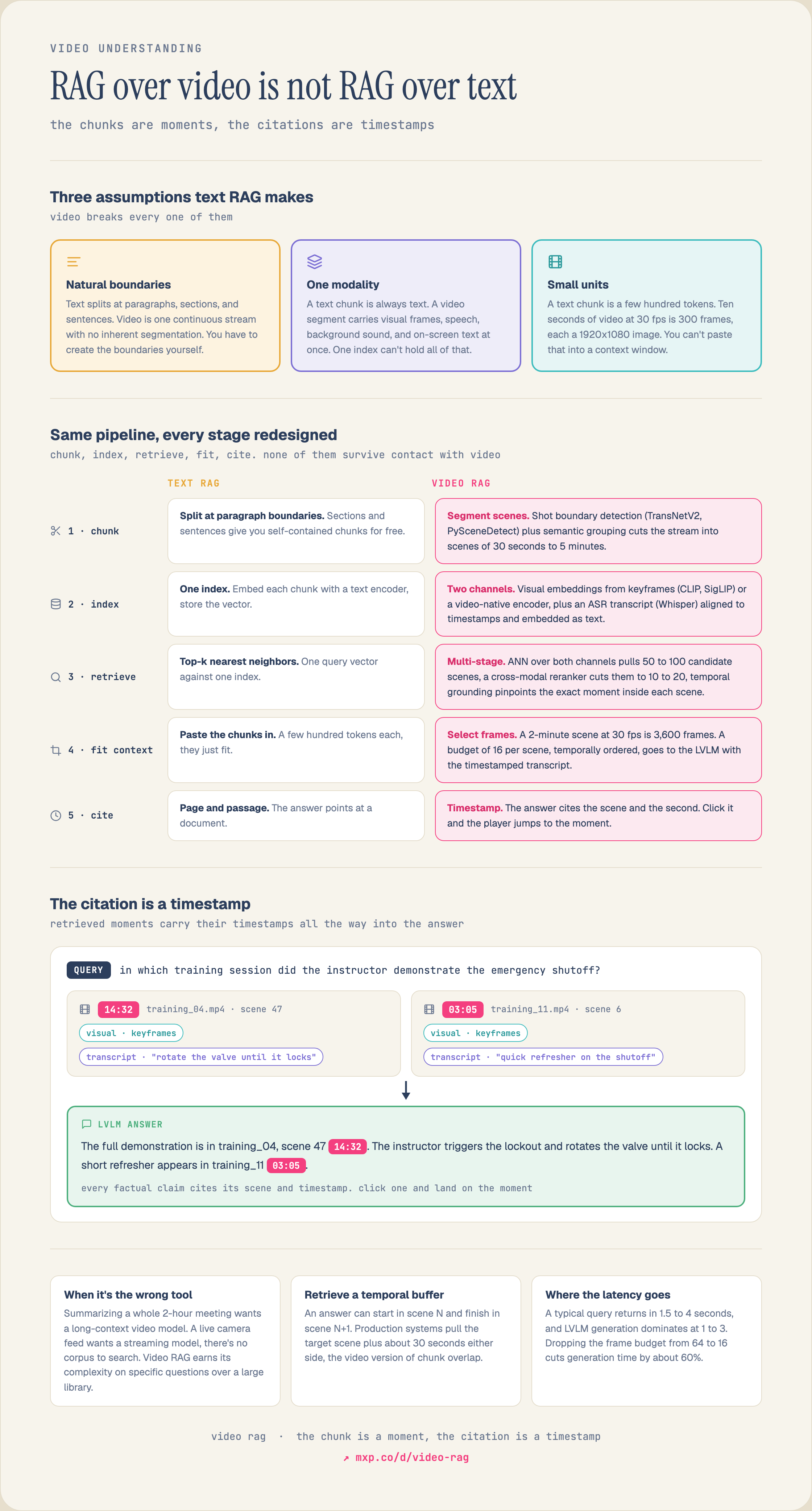
See the full diagram →
Why Video Is Harder Than Text
Text RAG has three convenient properties that video lacks:
1. Natural chunk boundaries. Text has paragraphs, sections, and sentences. You can split a document at these boundaries and each chunk is self-contained. Video has no such boundaries. A factory walkthrough, a meeting recording, or a surveillance feed is a continuous stream with no inherent segmentation.
2. Uniform modality. A text chunk is always text. You embed it, store the vector, and retrieve it. A video segment contains multiple modalities simultaneously: visual frames, speech audio, background sounds, on-screen text, and sometimes metadata like GPS coordinates or sensor readings. Each modality carries different information.
3. Small retrieval units. A text chunk is a few hundred tokens. A 10-second video clip at 30fps is 300 frames, each a 1920x1080 image. The raw data volume is orders of magnitude larger, and you cannot simply dump it into an LLM context window.
These differences mean that every stage of the RAG pipeline -- chunking, embedding, indexing, retrieval, and generation -- needs to be redesigned for video.
Stage 1: Scene-Level Chunking
The first step is decomposing continuous video into retrievable units. In text RAG, you chunk by paragraphs or fixed token windows. In Video RAG, the equivalent is scene segmentation.
Shot Boundary Detection
The most fundamental approach is shot boundary detection: identifying where the camera cuts from one shot to another. A shot is a continuous sequence of frames captured without interruption. Shot boundaries correspond to hard cuts (instant transitions), dissolves (gradual blends), and wipes.
The standard algorithm is frame-difference thresholding:
1. For each consecutive pair of frames, compute a distance metric (histogram difference, pixel-level L1/L2 distance, or embedding cosine distance). 2. If the distance exceeds a threshold, mark it as a shot boundary. 3. Merge shots that are too short (under a minimum duration) with their neighbors.
Modern approaches use learned detectors. TransNetV2 is a dilated 3D CNN that processes 100 frames at a time and predicts boundary probabilities with F1 scores above 0.96 on standard benchmarks. PySceneDetect is a widely-used open-source library that implements both threshold-based and content-aware detection.
Semantic Scene Segmentation
Shot boundaries are syntactic -- they detect camera edits but not semantic shifts. A conversation between two people may have dozens of shot-reverse-shot cuts, all belonging to the same semantic scene.
Semantic scene segmentation groups consecutive shots that share a common topic, setting, or activity. The typical approach:
1. Extract a feature vector for each shot (using the middle frame or a pooled representation across all frames). 2. Compute pairwise similarities between adjacent shots. 3. Identify scene boundaries where similarity drops below a threshold.
More sophisticated methods use temporal clustering: represent each shot as a point in embedding space, then find contiguous groups of shots that form a cluster. BaSSL (Boundary-aware Self-Supervised Learning) trains a temporal transformer to predict scene boundaries directly.
Choosing the Right Granularity
The granularity of your chunks determines the tradeoff between precision and context:
In practice, most Video RAG systems use scene-level segmentation with a minimum duration of 15-30 seconds and a maximum of 3-5 minutes. This matches the context window of current LVLMs and provides enough context for meaningful answers.
Stage 2: Dual-Channel Indexing
A text RAG pipeline has one index: text embeddings. A Video RAG pipeline needs at least two indexes that capture different modalities, because video contains information in both the visual channel and the audio/speech channel.
Channel 1: Visual Embeddings
For each scene, extract visual embeddings that capture what is shown on screen. There are two approaches:
Keyframe-based. Select representative frames from each scene (the first frame, middle frame, or the frame with the highest "information content" as measured by image entropy or sharpness). Embed each keyframe using a visual encoder like CLIP, SigLIP, or DINOv2. Store one or more vectors per scene.
Video-native. Use a video encoder that processes multiple frames jointly and captures temporal information. Models like InternVideo2, VideoPrism, or VideoMAE produce a single embedding that represents the entire clip, including motion, action sequences, and temporal dynamics. These embeddings capture information that keyframe-based approaches miss -- two scenes might have identical keyframes but very different actions.
The choice depends on your query patterns. If users search for static visual content ("find the slide about revenue projections"), keyframe embeddings suffice. If users search for actions or events ("find the moment the machine overheated"), video-native embeddings are better.
Channel 2: Transcript and Audio Embeddings
Extract the speech track and transcribe it using an ASR model (Whisper, Parakeet, or Cohere Transcribe). Align the transcript with timestamps so each word or sentence maps to a specific time in the video. Then embed the transcript segments using a text embedding model.
For non-speech audio (music, environmental sounds, machine noises), embed the audio using a model like CLAP that maps audio into the same embedding space as text descriptions.
Combining Channels
At retrieval time, you have two options for combining channels:
Late fusion. Query both indexes independently, get two ranked lists, and merge them using reciprocal rank fusion (RRF) or a learned score combiner. This is simpler to build and debug, and lets you weight channels differently per query.
Shared embedding space. Use an omnimodal model (like Jina Omni or Omni-Embed-Nemotron) that maps text, images, video, and audio into the same vector space. A single text query retrieves across all modalities simultaneously. This is architecturally simpler but depends on the quality of the unified model.
Stage 3: Retrieval
When a user query arrives, the retrieval stage must find the most relevant scenes from potentially millions of indexed segments.
Multi-Stage Retrieval for Video
Video retrieval benefits enormously from multi-stage pipelines:
Stage 1: Coarse retrieval. Use approximate nearest neighbor search (HNSW, IVF) over the visual and transcript embedding indexes. Retrieve the top 50-100 candidate scenes. This is fast (milliseconds) because it operates on pre-computed vectors.
Stage 2: Cross-modal reranking. A cross-encoder reranker jointly processes the query and each candidate scene's metadata (transcript snippet, visual description, detected objects) to produce a fine-grained relevance score. Models like Qwen3-VL-Reranker or Jina Reranker m0 can process multimodal inputs. This reduces the candidate set to 10-20 scenes.
Stage 3: Temporal grounding. For the top-ranked scenes, pinpoint the exact moment within the scene that answers the query. Temporal grounding models (like Marlin-2B or Cosmos-Reason2) take a natural language query and a video clip and return start/end timestamps. This narrows a 3-minute scene down to the specific 15-second segment the user needs.
Temporal Context Windows
A unique aspect of video retrieval is temporal context. When you retrieve a relevant 30-second scene, the scenes immediately before and after often contain important context. A conversation answer might start in scene N but be completed in scene N+1.
Production Video RAG systems typically retrieve the target scene plus a configurable temporal buffer (e.g., 30 seconds before and after). This is analogous to increasing chunk overlap in text RAG, but the cost is higher because each additional scene means more frames to process.
Stage 4: Frame Selection for LVLMs
You have retrieved the relevant scenes. Now you need to feed them to a vision-language model for answer generation. The challenge: a 2-minute scene at 30fps contains 3,600 frames. No LVLM can process all of them, and even if it could, most frames are redundant.
Frame selection determines which frames from the retrieved scenes are included in the LVLM's context window. This is the Video RAG equivalent of fitting text chunks into the LLM's context.
Strategies
Uniform sampling. Select every Nth frame to hit a target budget (e.g., 16 frames per scene). Simple and deterministic. Works well for slow-moving content (presentations, interviews) but misses brief important moments in fast-moving content.
Keyframe extraction. Select frames that maximize visual diversity within the scene. Cluster all frames by visual similarity and pick the centroid of each cluster. This ensures you capture every distinct visual state in the scene.
Query-driven selection. Score each frame against the user query using CLIP similarity, then select the top-K scoring frames. This focuses the LVLM's attention on the most query-relevant moments. The downside is that it requires computing CLIP embeddings for every frame at query time (or pre-computing and storing them).
Adaptive budgeting. Allocate more frames to scenes with higher retrieval scores and fewer frames to lower-ranked scenes. If your total budget is 32 frames and you retrieved 4 scenes, the top scene might get 12 frames while the bottom scene gets 4.
The Frame Budget Tradeoff
More frames mean more context for the LVLM but higher latency and cost. Empirical studies show diminishing returns past 32-64 frames per query for most tasks. For factual question answering, 16 frames per scene is often sufficient. For temporal reasoning ("what happened after the alarm went off"), 32-64 frames that are temporally ordered are needed.
Stage 5: Answer Generation
The final stage feeds the selected frames and transcript snippets to a vision-language model that generates the answer.
Context Assembly
The LVLM receives a structured prompt:
1. The user's question. 2. For each retrieved scene (ordered by relevance score): the selected frames, the transcript segment with timestamps, and any structured metadata (detected objects, scene description, speaker labels). 3. An instruction to cite the source scene and timestamp for any factual claims.
Grounded Generation
A critical requirement for Video RAG is that the generated answer links back to the source material. The user should be able to click a timestamp and jump to the exact moment in the video. This means the generation prompt must instruct the model to include temporal citations, and the pipeline must preserve the mapping from scene IDs to video URLs and timestamps.
Handling "Not Found"
Not every question has an answer in the video corpus. The LVLM must distinguish between "I found relevant content but the answer is ambiguous" and "nothing in the retrieved scenes addresses this question." Including the retrieval scores in the prompt (or setting a minimum score threshold before generation) helps the model calibrate its confidence.
Production Architecture
A production Video RAG system has two phases: an offline ingestion pipeline and an online query pipeline.
Offline: Ingestion Pipeline
Video Upload
    |
    v
Scene Segmentation (TransNetV2 / PySceneDetect)
    |
    v
Parallel Feature Extraction:
  - Keyframes --> Visual Encoder --> Visual Embeddings
  - Audio     --> ASR Model     --> Transcript + Text Embeddings
  - Frames    --> Object Detector --> Structured Metadata
    |
    v
Dual-Channel Vector Index (Visual + Text)
    |
    v
Metadata Store (scene boundaries, thumbnails, transcripts)
Online: Query Pipeline
User Query
    |
    v
Dual-Channel Retrieval (Visual + Transcript)
    |
    v
Cross-Modal Reranking
    |
    v
Temporal Grounding (optional: pinpoint exact moment)
    |
    v
Frame Selection (uniform / keyframe / query-driven)
    |
    v
LVLM Generation (with frames + transcript context)
    |
    v
Answer + Timestamp Citations
Latency Breakdown
In a typical production deployment:
| Stage | Latency | Notes |
|---|---|---|
| Embedding query | 5-15ms | Text encoder |
| ANN retrieval | 10-30ms | HNSW search across both channels |
| Reranking | 100-300ms | Cross-encoder over top-50 candidates |
| Temporal grounding | 200-500ms | Per-scene, parallelizable |
| Frame selection | 10-50ms | Pre-computed embeddings make this fast |
| LVLM generation | 1-3 seconds | Depends on frame count and model |
| Total | 1.5-4 seconds | Acceptable for interactive use |
The dominant cost is LVLM generation. Reducing the frame budget from 64 to 16 frames can cut generation time by 60%.
When to Use Video RAG vs. Other Approaches
Video RAG is not the right tool for every video task:
Mixpeek Implementation
Mixpeek's pipeline architecture maps directly to the Video RAG stages described above:
from mixpeek import Mixpeek

# The namespace goes on the client, which sends it with every request.
client = Mixpeek(api_key="YOUR_API_KEY", namespace="my-namespace")

# 1. A bucket for the source videos. bucket_schema declares what each object carries.
bucket = client.buckets.create(
    bucket_name="training-videos",
    bucket_schema={"properties": {"video": {"type": "video"}}},
)

# 2. One collection over that bucket. multimodal_extractor@v1 splits each video
# into segments and writes a visual index for every segment
# (vertex_multimodal_embedding). The transcript index
# (multilingual_e5_large_instruct_v1) is written only with both transcription
# switches on, and both default to off.
collection = client.collections.create(
    collection_name="training_library",
    source={"type": "bucket", "bucket_ids": [bucket["bucket_id"]]},
    feature_extractor={
        "feature_extractor_name": "multimodal_extractor",
        "version": "v1",
        "parameters": {"run_transcription": True, "run_transcription_embedding": True},
    },
)

# 3. Land a video as an object. Each blob names the schema property it fills.
client.buckets.upload(
    bucket["bucket_id"],
    key_prefix="safety-101",
    blobs=[{"property": "video", "type": "video", "data": "https://example.com/training/safety-101-session-03.mp4"}],
)
client.collections.trigger(collection["collection_id"])

# 4. The retriever. Visual and transcript search are two entries in ONE
# feature_search, so they run in parallel and RRF fuses them inside the stage.
# A cross-encoder then reranks the fused candidates against each segment's
# transcript, which is why it is a separate stage: it needs the query and the text.
retriever = client.retrievers.create(
    retriever_name="training-video-rag",
    collection_identifiers=["training_library"],
    input_schema={"query": {"type": "text", "required": True}},
    stages=[
        {
            "stage_name": "hybrid_candidates",
            "stage_id": "feature_search",
            "parameters": {
                "searches": [
                    {
                        "feature_uri": "mixpeek://multimodal_extractor@v1/vertex_multimodal_embedding",
                        "query": {"input_mode": "text", "value": "{{INPUT.query}}"},
                        "top_k": 50,
                    },
                    {
                        "feature_uri": "mixpeek://multimodal_extractor@v1/multilingual_e5_large_instruct_v1",
                        "query": {"input_mode": "text", "value": "{{INPUT.query}}"},
                        "top_k": 50,
                    },
                ],
                "fusion": "rrf",
                "final_top_k": 50,
            },
        },
        {
            "stage_name": "rerank_results",
            "stage_id": "rerank",
            "parameters": {
                "inference_name": "BAAI__bge_reranker_v2_m3",
                "query": "{{INPUT.query}}",
                "document_field": "transcription",
                "top_k": 10,
            },
        },
    ],
)

results = client.retrievers.execute(
    retriever["retriever_id"],
    inputs={"query": "emergency shutoff procedure demonstration"},
)
Frequently Asked Questions
What is Video RAG and how is it different from text RAG?
Video RAG is retrieval-augmented generation where the corpus is video rather than documents: the system retrieves the relevant scenes from a video library and feeds selected frames plus transcript to a vision-language model, which generates the answer. It differs from text RAG on three axes that the rest of this guide unpacks. Text has natural chunk boundaries (paragraphs, sections) while video is a continuous stream with no inherent segmentation, so you have to create the units with scene segmentation. Text is a uniform modality while a video segment carries visual frames, speech, background audio, and on-screen text at once, so one index is not enough. And a retrieved text chunk drops straight into a prompt, while a retrieved 2-minute scene at 30fps is 3,600 frames that no model can ingest, so you need a frame-selection stage that text RAG has no equivalent of.
How do you chunk a video for RAG?
By scene, not by fixed time windows. The baseline technique is shot boundary detection: find where the camera cuts by computing frame-to-frame difference and thresholding it, which catches hard cuts, dissolves, and wipes. Each resulting shot is a continuous sequence captured without interruption, which makes it a self-contained retrievable unit in the way a paragraph is for text. Fixed-length chunking is the video equivalent of splitting a document every 500 characters regardless of where sentences end: it will routinely cut a single action in half and glue the tail of one scene to the head of the next.
Why does Video RAG need more than one index?
Because video carries information in channels that do not overlap. Visual embeddings capture what is shown on screen, and speech embeddings capture what is said, and a query will often match only one of them. "The slide about Q3 revenue" is answerable from the visual channel; "when the speaker mentioned the recall" is answerable from the transcript. A single-index pipeline silently loses every query whose evidence lives in the channel it did not index, which is why the architecture here uses dual-channel indexing and fuses the results.
How many frames should you send to a vision-language model?
Far fewer than the scene contains, chosen deliberately. A 2-minute retrieved scene at 30fps is 3,600 frames; no LVLM can process them, and most are near-duplicates of their neighbours anyway. Frame selection is the Video RAG equivalent of fitting text chunks into a context window: uniform sampling takes every Nth frame to hit a fixed budget such as 16 per scene, which is simple and deterministic, while content-aware strategies pick frames that carry the most information. The budget is a real constraint to design around, not an implementation detail.
When should you not use Video RAG?
Whenever retrieval is not actually the bottleneck. For simple visual search such as "find all clips of red cars", embedding search answers it directly and the generation step adds cost without adding anything. For whole-video summarization, a long-context video model that ingests the entire file beats retrieval, because there is no subset to select. For real-time analysis of a live camera, there is no corpus to search at all, so the right tool is a streaming model. Video RAG earns its complexity when a question needs evidence located inside a large library and then reasoned over.