Reverse Video Search: Find Where a Clip Appears, With Timestamps
Submit a video, clip, or frame and get back every matching moment in your library: with the exact timestamp, not just the file. Powered by scene-level video embeddings, perceptual fingerprinting, and approximate nearest neighbor search over your own footage.
Can you reverse search a video the way Google reverse searches images?
No. There is no Google-style reverse video search over the public web. Google, TinEye and the other reverse image engines index still images, not video, so there is no service you can hand a clip to and ask where else on the internet it appears. The workaround people reach for is screenshotting a few frames and reverse image searching those, which does work for finding a recognizable still, and throws away motion and timing, so it cannot tell you which seconds of a longer video your clip came from.
What does work depends on which library you need to search. For a video you are about to publish on YouTube, upload it as private and let Content ID report its claims against the largest reference database that exists. For a still frame with a distinctive logo, face, or location, reverse image search on that frame is genuinely the fastest answer. For anything else, searching a library means indexing a library, and the practical question becomes which one you control or license.
Over footage you own, this is a solved problem rather than a workaround: index at the frame and scene level and you can query with an actual clip and get back the matching moments with timestamps, robust to re-encodes, crops and re-cuts. That is what the rest of this page is about, and the tools that do it are compared separately.
How does reverse video search work?
Updated August 2026 · Reviewed against current video encoders and fingerprinting practice
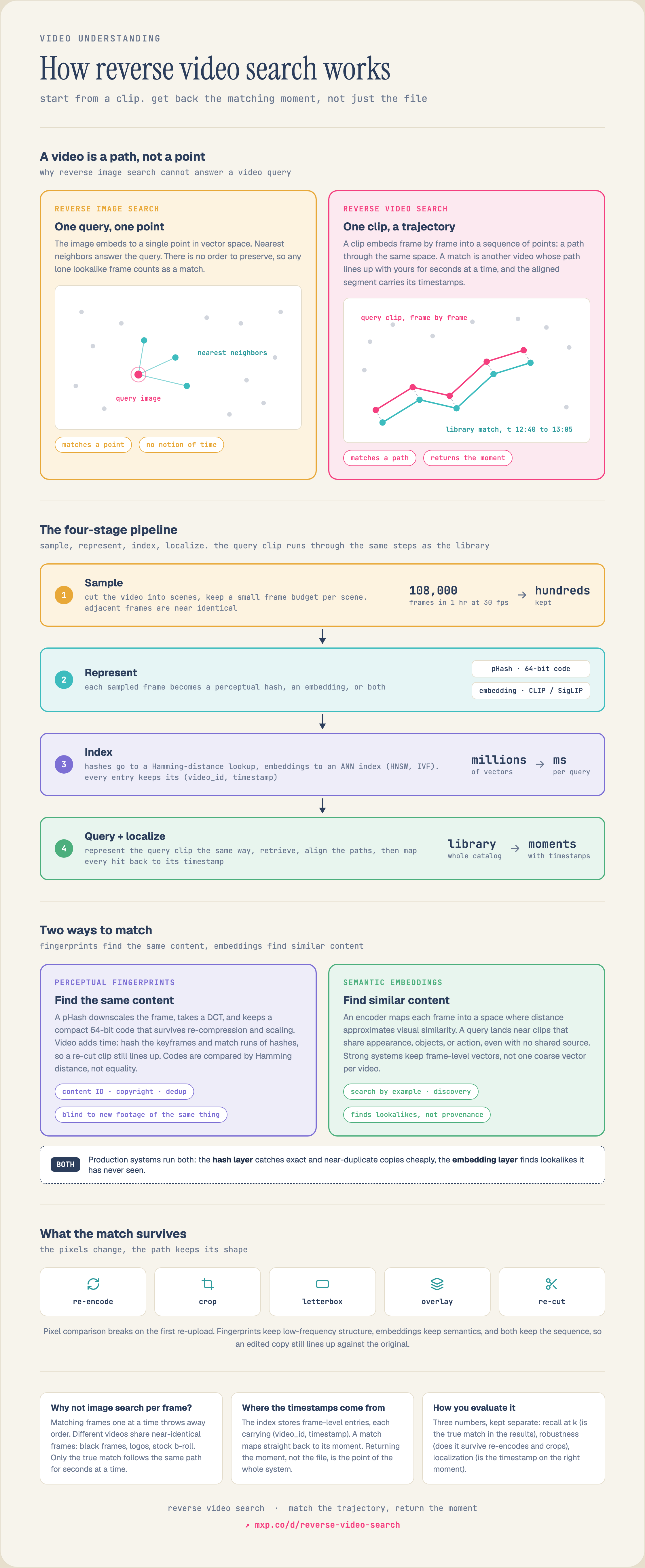
Reverse video search starts from a video, clip, or single frame instead of a text query, and returns the matching moments with the timestamp inside each video: not just the file. It works in four stages: each video is cut into scenes and a budget of representative frames is sampled per scene (an hour of 30fps footage is 108,000 frames, so sampling is what keeps indexing affordable); those frames are represented as either vector embeddings from a vision encoder or perceptual hashes; the representations go into an approximate nearest neighbor index at frame and scene granularity, each entry carrying a (video ID, timestamp) payload; then your query clip is processed the same way and the closest segments come back as timestamped moments.
The reason it cannot be done with reverse image search is that an image is a point in embedding space and a clip is a trajectory through it. Matching means finding another video whose path lines up with yours for seconds at a time. That is why frame-by-frame image search fails: lookalike frames like logos, black frames, and stock b-roll match anything, and order is what disambiguates: and why a real match survives re-encodes, crops, letterboxing, overlays, and re-cuts: the pixels change, but the path keeps its shape.
Two matching paradigms answer different questions. Perceptual fingerprinting (pHash and friends) answers “have I seen this exact content before?”: it is how content-ID, copyright, and deduplication systems work. Semantic embeddings (CLIP, SigLIP) answer “show me footage like this”: lookalikes, not provenance. Production systems usually run both: a cheap fingerprint pass for duplicates, then embedding search for discovery. Google does not offer true reverse video search over the public web; a dedicated system runs it over a library you control.
Go deeper: the technical guide · the diagram · tool comparison
What is Reverse Video Search?
Instead of typing keywords, you query with a video. The system samples your clip, embeds it, and finds the closest matching moments across every indexed video: robust to re-encodes, trims, and crops, and precise to the timestamp.
The Moment, Not the File
Video is indexed at scene and frame granularity, so a match points at the second a shot appears inside an hour-long file. Editors land on the shot; rights teams cite the exact reuse.
Duplicates and Lookalikes
Perceptual fingerprinting catches exact and near-duplicate copies (content-ID, dedup). Vector embeddings catch semantically similar footage. Production systems run both layers over the same library.
Your Library, Not the Web
Google cannot reverse search video. This runs over the footage you control (archives, DAMs, UGC queues, licensed catalogs) with your metadata attached to every match.
How Reverse Video Search Works
Four stages turn raw footage into a queryable index. The full technical treatment (sampling budgets, fingerprint construction, evaluation) is in the reverse video search guide.
Segment and Sample
Each video is cut into scenes, and a small budget of representative frames is sampled per scene. An hour of 30fps video is 108,000 frames; sampling is what keeps indexing affordable without losing recall.
Embed Every Segment
Sampled frames and segments are encoded into vector embeddings (or perceptual fingerprints for exact-copy matching). Frame-level vectors are what make matches precise instead of whole-file guesses.
Index and Match
Vectors go into an approximate nearest neighbor index. At query time your reference clip is sampled and embedded the same way, and the closest segments come back in milliseconds.
Return Timestamped Moments
Because the index is at frame and scene granularity, every match maps back to a timestamp: the exact moment inside a longer video. That is the difference between finding a file and finding the shot.
Reverse Image Search vs Reverse Video Search
Same idea (query by example instead of keywords) but video adds the time dimension, and that changes what gets indexed and what a match means. For stills, see reverse image search.
| Aspect | Reverse Image Search | Reverse Video Search |
|---|---|---|
| Query input | A still image | A video, clip, or frame |
| What is indexed | One embedding per image | Embeddings per scene / sampled frame |
| What a match returns | The matching image | The matching video + timestamp of the moment |
| Extra dimension | None | Time: motion, edits, sequence |
| Robustness challenge | Crops, recolors, rotation | Re-encodes, trims, overlays, speed changes |
| Typical uses | Visual shopping, image dedup | Content-ID, footage reuse, archive dedup, clip lookup |
What Teams Build With It
Find Every Reuse of a Clip
Drop in a reference clip and surface every place it appears across your library: re-encodes, crops, and edits included. The match comes back with the exact timestamp inside each video, not just the file.
Video Deduplication
Collapse near-identical takes, re-uploads, and re-exports in a footage archive or UGC queue. Frame-level embeddings catch duplicates that filename and checksum comparison never will.
Editor Footage Lookup
Editors search stock and archive footage by dropping in a reference clip instead of guessing keywords. 'More shots like this one' becomes a query, with results ranked by visual similarity.
Rights and Moderation Matching
Match user-uploaded video against a reference set (licensed content, known-bad material, or brand assets) and block, license, or escalate based on similarity score and matched timestamp.
Build It in One API
Segment, embed, index, and query: without stitching a frame sampler, an embedding model, and a vector database together yourself.
from mixpeek import Mixpeek

client = Mixpeek(api_key="YOUR_API_KEY")

# 1. Create a collection that samples scenes + extracts video embeddings
client.collections.create(
    collection_name="footage-library",
    feature_extractors=[
        {"type": "multimodal_embedding",
         "settings": {"chunking": "scene", "max_frames_per_scene": 8}},
    ],
)

# 2. Point it at your footage (or S3/GCS bucket) and process
client.buckets.upload(
    bucket_name="raw-footage",
    files=["broll_034.mp4", "interview_012.mp4", "..."],
    auto_process=True,
)

# 3. Build a reverse video search retriever
retriever = client.retrievers.create(
    retriever_name="reverse_video_search",
    inputs=[{"name": "query_video", "type": "video"}],
    settings={
        "stages": [
            {"type": "feature_search", "method": "vector",
             "modalities": ["video"], "limit": 50},
            {"type": "rerank", "model": "cross-encoder-vision", "limit": 12},
        ]
    },
)

# 4. Search by a reference clip: results carry TIMESTAMPS
results = client.retrievers.execute(
    retriever_id=retriever.retriever_id,
    inputs={"query_video": "https://example.com/reference_clip.mp4"},
)

for doc in results.documents:
    # each match points at the moment inside the video, not just the file
    print(doc.metadata["video_id"], doc.metadata["start_time"], doc.score)
Already generate your own video embeddings? Bring them to MVS and run dense, sparse, and BM25 search on your object storage: from $25/mo for up to 1M vectors.
Reverse Video Search FAQ
What is reverse video search?
Reverse video search starts from a video, clip, or single frame, instead of a text query, and finds matching or visually similar videos. Good systems return the timestamp of the matching moment inside each video, not just the file. Two techniques power it: perceptual fingerprinting for exact and near-duplicate matches (content-ID), and vector embeddings for semantic similarity (find footage like this).
How does reverse video search work?
Four stages: (1) Segment, each video is cut into scenes and a few representative frames are sampled per scene. (2) Represent: sampled frames become vector embeddings from a vision encoder, or perceptual hashes for copy detection. (3) Index: vectors go into an approximate nearest neighbor index at frame/scene granularity. (4) Match: your query clip is processed the same way and the nearest segments come back with video IDs and timestamps. The full technical breakdown is in our reverse video search guide.
Can I reverse search a video the way Google reverse searches images?
Google does not offer true reverse video search over the public web: the common workaround is screenshotting frames and reverse image searching them, which loses motion and timing. A dedicated reverse video search system indexes video at the frame and scene level, so you can query with an actual clip and get back timestamped matches. Systems like Mixpeek run this over your own library rather than the public web.
How do I find where a video clip came from or where it was reused?
Index the library you control (or the sources you license) with frame-level embeddings or fingerprints, then query with the clip. Fingerprinting identifies exact and near-duplicate copies even after re-encoding and cropping: this is how content-ID systems work. Embedding search finds semantically similar footage even when it is not the same source. Production rights systems run both layers.
What is the difference between reverse video search and reverse image search?
Reverse image search matches one still against indexed stills. Reverse video search adds time: videos are segmented, sampled, and indexed at frame/scene level, so a match points at the exact moment inside a longer video, and the system must be robust to re-encodes, trims, and overlays rather than just crops and recolors. See our reverse image search page for the still-image version.
Fingerprinting vs embeddings, which do I need?
Use perceptual fingerprinting when the question is 'have I seen this exact content before?': copyright, content-ID, dedup of re-encodes. Use embeddings when the question is 'show me footage like this': semantic similarity across different sources. They compose: a fingerprint layer catches duplicates cheaply, an embedding layer handles discovery. Our comparison of the best reverse video search tools breaks down which products take which approach.
Can reverse video search return the exact timestamp of a match?
Yes: that is the defining capability of a good implementation. Because indexing happens at the frame and scene level, each match carries the offset of the matching moment inside the source video. Mixpeek returns timestamped segments, so an editor lands on the shot and a rights team can cite the exact second of a reuse.
How accurate is reverse video search on re-encoded or edited copies?
Fingerprinting is engineered for exactly this: perceptual hashes survive re-compression, resolution changes, letterboxing, and moderate overlays, and matching runs of hashes lines up trimmed or re-cut clips against the original. Embedding-based matching is naturally robust to visual perturbations but trades exactness for semantic reach. Evaluate on your own transformations: re-encode, crop, and overlay your test clips and measure recall on each.
How much does it cost to run reverse video search at scale?
The dominant cost is embedding extraction, which scales with how many frames you sample per minute of video: not storage or query. Scene-adaptive sampling with a per-scene frame budget typically cuts extraction cost several-fold versus fixed-rate sampling with no recall loss. Mixpeek Managed processes video at 200 credits per minute (about $0.20); search and retrieval are free. Bringing your own embeddings to MVS skips extraction cost entirely.
How does Mixpeek support reverse video search?
Mixpeek runs the full pipeline as a managed service: scene segmentation, frame sampling, video embeddings, indexing, and a retriever API that accepts a clip, frame, or text query and returns timestamped matching moments. The same index serves cross-modal search over images, audio, and documents, and every retriever is callable as an MCP tool by agents. If you already generate your own video embeddings, MVS (Mixpeek Vector Store) hosts them on your object storage with dense, sparse, and BM25 search.
Everything We've Published on Reverse Video Search
This page is the starting point. Each piece below goes deeper on one part of it.
How Reverse Video Search Works
The vendor-neutral technical treatment: sampling budgets, fingerprint construction, ANN index choice, and how to evaluate on recall, robustness, and localization.
A Clip Is a Trajectory, Not a Point
The one-picture explanation of why reverse image search cannot do video, and why a match survives re-encodes, crops, and re-cuts.
Meta's Video Similarity Challenge (VSC23)
The benchmark that defines video copy detection: why matching a sequence of per-second descriptors beats a single whole-video embedding, and by how much.
Best Reverse Video Search Tools
How the available tools actually differ, fingerprinting versus embedding approaches, what each one indexes, and when to pick which.
Best Video Search Tools
The wider category: searching video by text, by clip, and by face, and where reverse video search fits among them.
Reverse Image Search
The single-frame case. Same retrieval machinery, one less dimension: useful background if you are starting from images.
Perceptual Hashing & Near-Duplicate Detection
How pHash actually works, and where fingerprinting beats embeddings for exact-copy and content-ID matching.