What Reverse Video Search Is
Reverse video search starts from a video, a clip, or a single frame and finds matching or visually similar videos, instead of matching a text query. It is the video equivalent of reverse image search, with one extra dimension: time. A good reverse video search engine does not just tell you *which* video matches, it tells you *where* -- the timestamp of the matching moment inside a longer file. Two families of technique power it: perceptual fingerprinting for exact and near-duplicate matches, and vector embeddings for semantic similarity.
This guide is the technical companion to the reverse video search overview, which covers the product surface and links the rest of the cluster.
If you are choosing a tool rather than building one, see the best reverse video search tools. This guide is about how the machinery actually works, vendor-neutral, so you can build it or reason about it.
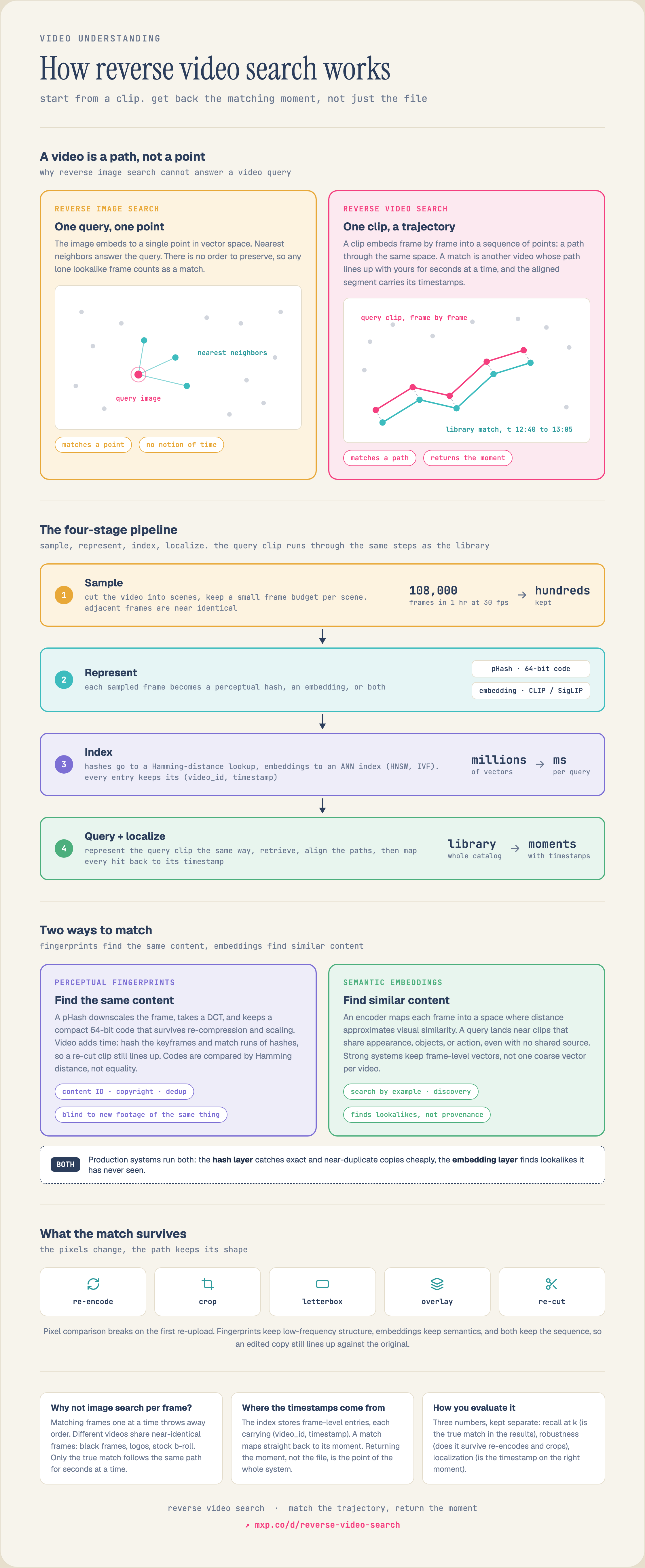
See the full diagram →
Fingerprints vs Embeddings: The Two Ways to Match Video
For the research framing of this split, and the benchmark numbers behind it, see Meta's Video Similarity Challenge (VSC23), which measures detection and localization separately.
Every reverse video search system is built on one of two matching paradigms, and the right one depends on whether you are looking for *the same content* or *similar content*.
| Perceptual fingerprinting | Semantic embeddings |
| Matches | The same content, re-encoded, cropped, or lightly edited | Visually or semantically similar content |
| Built from | Compact perceptual hashes (pHash, wavelet, temporal hashes) | Dense vectors from a vision or video encoder |
| Robust to | Re-compression, resolution changes, minor overlays | Different scenes that share appearance, action, or meaning |
| Blind to | Genuinely different footage of the same thing | Exact provenance (it finds lookalikes, not the original) |
| Classic use | Copyright, content-ID, dedup, rights management | Search-by-example, recommendation, discovery |
How a Reverse Video Search Engine Works
The pipeline is the same shape whichever paradigm you pick. It has four stages.
1. Sample. You cannot embed or hash every frame -- an hour of 30fps video is 108,000 frames, and adjacent frames are near-identical. You first cut the video into scenes, then sample a small budget of frames per scene. The sampling policy is the biggest lever on cost and recall; see Video Frame Sampling and Video Scene Segmentation.
2. Represent. Each sampled frame (or short segment) becomes either a perceptual hash or a video embedding. Embeddings come from contrastive vision-language encoders like CLIP or SigLIP, or from video-native encoders; see how contrastive models work.
3. Index. Hashes go into a hash index with a Hamming-distance lookup; embeddings go into an approximate-nearest-neighbor (ANN) index built with HNSW or IVF-style structures so you can query millions of vectors in milliseconds.
4. Query and localize. At query time you run the same representation step on the query clip, retrieve the nearest matches, and -- because the index is at frame or scene granularity -- map each match back to its timestamp. Returning the moment, not just the file, is what makes reverse video search useful; see Video Temporal Grounding.
Perceptual Fingerprinting: Matching the Same Content
A perceptual hash is a short, robust signature of visual content designed so that near-identical frames produce near-identical hashes, and you compare them by Hamming distance rather than exact equality. The classic image construction (pHash) downscales a frame, takes a discrete cosine transform, and thresholds the low-frequency coefficients against their median to produce a 64-bit code that survives re-compression and scaling. For video you add a temporal dimension: hash sampled keyframes and match runs of hashes, so an edited or re-cut clip still lines up against the original. The same idea powers audio: see audio fingerprinting with constellation and landmark hashing and the deeper treatment in perceptual image hashing and near-duplicate detection. Fingerprinting is what content-ID and copyright systems use, because it identifies *known* content rather than guessing at similarity.
Semantic Embeddings: Matching Similar Content
When you want lookalikes rather than duplicates -- "find scenes like this one" -- you need embeddings. An encoder maps each frame or segment into a high-dimensional vector where distance approximates visual and semantic similarity, so a query clip's vector lands near vectors of clips that share appearance, objects, or action even if they were never derived from the same source. Because a single coarse vector per video loses the detail that makes matches precise, strong systems keep frame- or region-level vectors and match at that granularity; this is the same motivation behind late interaction retrieval. The tradeoff is that embeddings find similarity, not provenance: they will happily return a different creator's footage of the same landmark, which is a feature for discovery and a bug for rights enforcement.
How to Build One
A minimal reverse-video-search pipeline, in the order the stages run:
# 1. Segment + sample: cut into scenes, keep a few frames per scene
scenes = scene_segment(video)
frames = [f for s in scenes for f in sample_frames(s, max_frames=8)]

# 2. Represent: embed each frame (or hash it for near-dup matching)
vectors = [embed(f.image) for f in frames]        # semantic similarity
# hashes = [phash(f.image) for f in frames]       # near-duplicate / content-ID

# 3. Index: store vectors with their (video_id, timestamp) payload
index.upsert([(v, {"video_id": f.video_id, "t": f.timestamp})
              for v, f in zip(vectors, frames)])

# 4. Query by an example clip, return matches WITH timestamps
q_frames = sample_frames(query_clip, max_frames=8)
hits = index.search([embed(f.image) for f in q_frames], top_k=20)
# each hit carries the video_id + timestamp of the matching moment
The two hard parts are not in this sketch: choosing a sampling budget that keeps recall without exploding cost, and building an index that stays fast as the library grows into millions of vectors. Both are covered in Video Frame Sampling and ANN algorithms.
Reverse video search quality is not one number. Measure three things separately. Recall at a fixed k: for a set of known matches, how often does the true match appear in the top results? Robustness: re-encode, crop, letterbox, and overlay your query clips, then confirm the match survives -- this is where fingerprinting and embeddings diverge most. Localization: when a match is found, how close is the returned timestamp to the true moment? A system that finds the right video but points at the wrong minute is not solving the problem. For the full methodology, see evaluating multimodal retrieval.
Mixpeek does reverse video search as a managed pipeline: it segments and samples your video, generates embeddings, indexes them, and lets you query by a clip, a frame, or text and get back timestamped matching moments -- the four stages above without stitching a frame sampler, an embedding model, and a vector database together yourself. It is a token-level multimodal index over object storage, so the same query surface returns matches across video, images, audio, and documents, and every result is an MCP tool call an agent can make.
If you already run your own video encoder and have done your own sampling, you do not need managed extraction: bring the vectors to MVS, the Mixpeek Vector Store, and run dense, sparse, and BM25 search directly on your object storage. Either way you get frame- and scene-level results with timestamps, not just whole-file hits. See the best reverse video search tools for how this compares to fingerprinting engines and cloud video APIs.
Best Reverse Video Search Tools
Best Video Search Tools
Best Reverse Image Search APIs
Video Frame Sampling for Embeddings
Perceptual Image Hashing and Near-Duplicate Detection
Video Temporal Grounding
MVS: Agent-native vector store on object storage
How to Evaluate It
Reverse video search quality is not one number. Measure three things separately. Recall at a fixed k: for a set of known matches, how often does the true match appear in the top results? Robustness: re-encode, crop, letterbox, and overlay your query clips, then confirm the match survives -- this is where fingerprinting and embeddings diverge most. Localization: when a match is found, how close is the returned timestamp to the true moment? A system that finds the right video but points at the wrong minute is not solving the problem. For the full methodology, see evaluating multimodal retrieval.
Reverse Video Search with Mixpeek
Mixpeek does reverse video search as a managed pipeline: it segments and samples your video, generates embeddings, indexes them, and lets you query by a clip, a frame, or text and get back timestamped matching moments -- the four stages above without stitching a frame sampler, an embedding model, and a vector database together yourself. It is a token-level multimodal index over object storage, so the same query surface returns matches across video, images, audio, and documents, and every result is an MCP tool call an agent can make.
If you already run your own video encoder and have done your own sampling, you do not need managed extraction: bring the vectors to MVS, the Mixpeek Vector Store, and run dense, sparse, and BM25 search directly on your object storage. Either way you get frame- and scene-level results with timestamps, not just whole-file hits. See the best reverse video search tools for how this compares to fingerprinting engines and cloud video APIs.