RTSP Live Monitoring Wall
Turn always-on RTSP cameras into a searchable monitoring wall where quiet footage is skipped before extraction, kept segments carry gate verdicts, and email alerts fire from retriever results.
One click creates the whole RTSP wall: gated capture, searchable kept segments, alerts on arriving footage and a scheduled health watch. You add the camera.
Security, operations, facilities, city-camera and media teams that need live camera footage searchable without paying to analyze every unchanged minute.
What deploys today9 ready1 need your inputWhat deploys today
What each part needs
The states are read from the manifest, so a part it ships commented out never shows as ready.
- segments-index
- Deploys and processes documents as they arrive.
- segments-analysis
- Deploys and processes documents as they arrive.
- similar-segments
- Deploys and answers queries once its collections hold documents.
- segment-search
- Deploys and answers queries once its collections hold documents.
- match-monitor
- Deploys and answers queries once its collections hold documents.
- match-control
- Deploys and answers queries once its collections hold documents.
- unjudged-monitor
- Deploys and answers queries once its collections hold documents.
- analysis-monitor
- Deploys and answers queries once its collections hold documents.
- recent-segments
- Deploys and answers queries once its collections hold documents.
- camera-feed
- Add your rtsp after the deploy: paste its url into the commented camera block and apply again with mode=create_missing, or create the connection in Studio. Nothing is captured, and nothing is paid for, until you do.
What it looks like
Pick a frame or a search and see what fires.
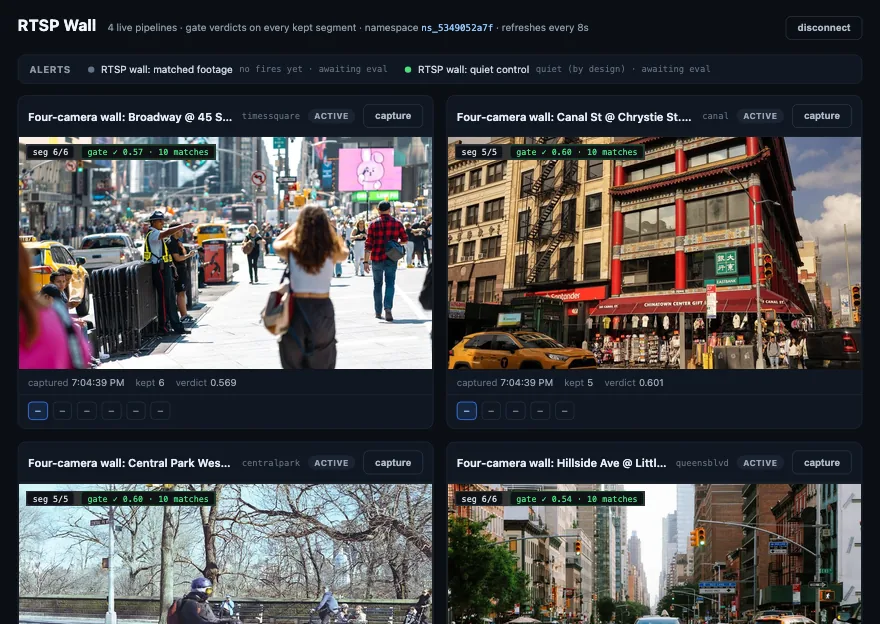 cleared
- camera-feed -> camera-sync -> camera-segments
- Camera A · searchable
- Camera B · processing
- route: cleared
Camera A · searchableCamera B · processingclearedgate_top_score 0.58 · match_count 10unchanged frame droppedexcludedmatched-footage alert stripreviewinterval watch · latency bound 15snotify_on failureclearedHow the namespace is wired
The diagram shows 1 buckets, 2 collections, 0 clean views and 7 retrievers. The manifest below applies 1 buckets, 2 collections (clean views included) and 7 retrievers today; the other parts are commented out in it, each with the reason. The diagram generates the manifest, so they cannot drift apart.
Reward signals
How reviewer decisions move the thresholds
Thresholds at ingest drift as the corpus changes. The reviewers working the queue are the ones who see where a threshold is wrong first, so this template routes their decisions back into the model that set it.
Operators tune scene_change_threshold, gate_top_score bars and control thresholds from reviewed camera runs. Those settings live on the connection and retriever resources, not in a dashboard-only note.
Every kept segment carries gate_applied, gate_top_score and gate_match_count. Alert executions and trigger failures become the operational signal that a camera, threshold or gate has drifted.
camera-segmentssegments-indexsegments-analysismatched-footage executionswall-health-watch executionsSystem collections in your namespace, on the same vector store as the rest of the template. They are yours to query.
Replay captured segments through candidate thresholds, compare retained minutes against alert precision, then update the connection or retriever settings when the measured tradeoff is better.
One file spins up the namespace. Generated from the diagram above. Also served at /templates/rtsp-live-monitoring.namespace.yaml.
# rtsp-live-monitoring: one manifest spins up the namespace.
# Platform manifest schema (GET /v1/discovery/schema). Validate with POST /v1/manifest/validate,
# apply with POST /v1/manifest/apply or the Deploy button. Wiring comes from the flow diagram:
# edges are bucket -> collection sources, collection -> retriever scope, retriever -> view.
# Applying a SECOND time, over a namespace this template already created: use
# POST /v1/manifest/apply?mode=create_missing, which creates what is missing and leaves
# what exists alone. The default, create_only, fails the WHOLE apply and rolls it back if
# any resource already exists, so an upgrade looks like a dead end without this. Use
# mode=upsert to also patch resources that exist but have drifted from this file.
version: '1.0'
metadata:
  name: rtsp-live-monitoring
  description: "Namespace template rtsp-live-monitoring. Generated from the flow diagram on mixpeek.com/templates/rtsp-live-monitoring."
namespaces:
  - name: rtsp-live-monitoring
    description: "Everything below lives in this namespace."
    feature_extractors:
      - name: passthrough_extractor
        version: v1
      - name: multimodal_extractor
        version: v2
    # Daily spend budget, in dollars of what you are charged (1,000 credits a dollar).
    # New batches pause once the namespace has spent this much today; queries are not capped.
    # Raise it later on the namespace: PATCH /v1/namespaces/<id> {"spend_budget": {"daily_usd": N}}.
    budget:
      daily_usd: 1

# Add your camera. This block is the shape the sync below expects:
# create the connection in Studio (Settings -> Connections) or uncomment
# this and apply again with a url you can reach. Apply live-tests a
# connection, so a url that is wrong or unreachable fails the whole
# deploy; left commented, the namespace comes up complete and waits.
# storage_connections:
#   - name: camera-feed
#     provider: rtsp
#     description: "Your camera. Paste its rtsp:// url here, add a credentials block if it needs one, and apply again with mode=create_missing. The gate retriever judges each segment before admission; gate_on_error publish means a broken gate costs extraction, never footage."
#     config:
#       url: "rtsp://strmr3.sha.maryland.gov/rtplive/3801d561005e00d00057fa36c4235c0a"
#       transport: tcp
#       segment_seconds: 10
#       segments_per_run: 3
#       scene_change_threshold: 6
#       gate_retriever_id: similar-segments
#       gate_on_error: publish
#       gate_timeout_seconds: 30
buckets:
  - name: camera-segments
    namespace: rtsp-live-monitoring
    description: "No source connected yet. Upload files here, or connect a storage source to this bucket in Studio."
    schema:
      properties:
        segment:
          type: video
        captured_at:
          type: string
        segment_index:
          type: integer
        gate_applied:
          type: boolean
        gate_top_score:
          type: number
        gate_match_count:
          type: integer
    # Alerts that run as each object lands, on the bucket's own collection.
    alert_applications:
      - alert: matched-footage
        input_mappings:
          - input_key: captured_at
            source: {source_type: document_field, path: captured_at}
      - alert: matched-footage-control
        input_mappings:
          - input_key: captured_at
            source: {source_type: document_field, path: captured_at}
      - alert: unjudged-footage
        input_mappings:
          - input_key: captured_at
            source: {source_type: document_field, path: captured_at}

# bucket_syncs:
#   - name: camera-sync
#     bucket: camera-segments
#     connection: camera-feed
#     source_path: camera-feed
#     sync_mode: continuous
#     polling_interval_seconds: 300
#     # note: Captures 30 of every 300 seconds (segment_seconds x segments_per_run per poll). It feeds segments-index and the bucket's own collection; segments-analysis is fed only by the alerts' batch action, so it holds what matched rather than everything captured.
#     batch_collection_ids:
#       - segments-index
#     schema_mapping:
#       mappings:
#         segment:
#           target_type: blob
#           blob_type: video
#           blob_property: segment
#           source:
#             type: file
#         captured_at:
#           target_type: field
#           source:
#             type: rtsp_field
#             field: captured_at
#         segment_index:
#           target_type: field
#           source:
#             type: rtsp_field
#             field: segment_index
#         gate_applied:
#           target_type: field
#           source:
#             type: rtsp_field
#             field: applied
#         gate_top_score:
#           target_type: field
#           source:
#             type: rtsp_field
#             field: top_score
#         gate_match_count:
#           target_type: field
#           source:
#             type: rtsp_field
#             field: match_count
collections:
  - name: segments-index
    namespace: rtsp-live-monitoring
    description: "Payload view of every kept segment: the verdict fields are readable and filterable here without waiting for analysis. Feeds recent-segments."
    source:
      type: bucket
      bucket: camera-segments
    feature_extractor:
      name: passthrough_extractor
      version: v1
      field_passthrough: []
    enabled: true
  - name: segments-analysis
    namespace: rtsp-live-monitoring
    description: "Multimodal embeddings of the segments an alert sent here, and the corpus the admission gate searches, so the gate sharpens as matched footage accrues. Feeds similar-segments, segment-search, analysis-monitor, matched-analysis."
    source:
      type: bucket
      bucket: camera-segments
    feature_extractor:
      name: multimodal_extractor
      version: v2
      input_mappings:
        video: segment
      field_passthrough: []
    alert_applications:
      - alert: matched-analysis
        input_mappings:
          - input_key: marker
            source: {source_type: constant, value: "ingest"}
    enabled: true
retrievers:
  - name: similar-segments
    namespace: rtsp-live-monitoring
    description: "The admission gate: embeds a captured segment and searches the analysed footage for its nearest match."
    collections:
      - segments-analysis
    input_schema:
      segment:
        type: video
        required: true
        description: "The media to match; encoded by the index below and compared against it"
    stages:
      - stage_name: search
        stage_id: feature_search
        parameters:
          searches:
            - feature_uri: "mixpeek://multimodal_extractor@v2/gemini-embedding-2"
              query:
                input_mode: content
                value: "{{INPUT.segment}}"
              top_k: 25
          fusion: rrf
          final_top_k: 25
    tags:
      - template:rtsp-live-monitoring
  - name: segment-search
    namespace: rtsp-live-monitoring
    description: "Type what you are looking for, for example 'yellow taxi', and search the analysed footage. The analyst's entry point after an alert."
    collections:
      - segments-analysis
    input_schema:
      query:
        type: text
        required: true
        description: "What to look for; searched across every index below"
    stages:
      - stage_name: search
        stage_id: feature_search
        parameters:
          searches:
            - feature_uri: "mixpeek://multimodal_extractor@v2/gemini-embedding-2"
              query:
                input_mode: text
                value: "{{INPUT.query}}"
              top_k: 10
          fusion: rrf
          final_top_k: 10
    tags:
      - template:rtsp-live-monitoring
  - name: match-monitor
    namespace: rtsp-live-monitoring
    description: "Alert 1's discriminator. It reads the bucket itself, where an object is searchable the moment it lands, and keeps the arriving object when the gate judged it and the verdict cleared 0.5. Materialises into matched-footage."
    collections:
      - camera-segments
    input_schema:
      captured_at:
        type: text
        required: true
        description: "captured_at of the arriving object, supplied by the alert attachment"
    stages:
      - stage_name: verdict_filter
        config:
          stage_id: attribute_filter
          parameters:
            conditions:
              AND:
                - field: captured_at
                  operator: eq
                  value: "{{INPUT.captured_at}}"
                - field: gate_applied
                  operator: eq
                  value: true
                - field: gate_top_score
                  operator: gte
                  value: 0.5
    tags:
      - template:rtsp-live-monitoring
  - name: match-control
    namespace: rtsp-live-monitoring
    description: "The same filter at a bar nothing clears. An alert on this staying silent is what makes a firing on match-monitor mean something. Materialises into matched-footage-control."
    collections:
      - camera-segments
    input_schema:
      captured_at:
        type: text
        required: true
        description: "captured_at of the arriving object, supplied by the alert attachment"
    stages:
      - stage_name: verdict_filter
        config:
          stage_id: attribute_filter
          parameters:
            conditions:
              AND:
                - field: captured_at
                  operator: eq
                  value: "{{INPUT.captured_at}}"
                - field: gate_applied
                  operator: eq
                  value: true
                - field: gate_top_score
                  operator: gte
                  value: 0.99
    tags:
      - template:rtsp-live-monitoring
  - name: unjudged-monitor
    namespace: rtsp-live-monitoring
    description: "Segments the gate could not judge. On a new namespace the corpus is empty, so the first segments arrive unjudged and this carries them into analysis; once the corpus exists it goes quiet. Materialises into unjudged-footage."
    collections:
      - camera-segments
    input_schema:
      captured_at:
        type: text
        required: true
        description: "captured_at of the arriving object, supplied by the alert attachment"
    stages:
      - stage_name: verdict_filter
        config:
          stage_id: attribute_filter
          parameters:
            conditions:
              AND:
                - field: captured_at
                  operator: eq
                  value: "{{INPUT.captured_at}}"
                - field: gate_applied
                  operator: eq
                  value: false
    tags:
      - template:rtsp-live-monitoring
  - name: analysis-monitor
    namespace: rtsp-live-monitoring
    description: "Alert 2's discriminator, on the analysis collection. A segment that decomposed into more than one scene had motion inside the captured window. Materialises into matched-analysis."
    collections:
      - segments-analysis
    input_schema:
      marker:
        type: text
        required: false
        description: "Constant supplied by the alert attachment; the filter is what selects"
    stages:
      - stage_name: verdict_filter
        config:
          stage_id: attribute_filter
          parameters:
            conditions:
              AND:
                - field: start_time
                  operator: gt
                  value: 0
    tags:
      - template:rtsp-live-monitoring
  - name: recent-segments
    namespace: rtsp-live-monitoring
    description: "Every kept segment, newest first in the index. The health watch runs this because it needs no input, so an error or a slow run means the wall itself is unwell. Materialises into wall-health-watch."
    collections:
      - segments-index
    input_schema:
      limit:
        type: text
        required: false
        description: "Optional cap on documents grouped per run"
    stages:
      - stage_name: verdict_filter
        config:
          stage_id: attribute_filter
          parameters:
            conditions:
              AND:
                - field: segment_index
                  operator: gte
                  value: 0
    tags:
      - template:rtsp-live-monitoring
alerts:
  - name: matched-footage
    namespace: rtsp-live-monitoring
    description: "Alert 1. Fires as an object lands carrying a verdict that cleared the bar, emails the org notifications address (Settings -> Notifications; unset means opted out) and batches the object into segments-analysis."
    source: retriever
    retriever: match-monitor
    trigger_on: results
    notification_config:
      channels:
        - channel_type: email
        - channel_type: batch
          config:
            collection_id: segments-analysis
      include_matches: true
      include_scores: true
    enabled: true
  - name: matched-footage-control
    namespace: rtsp-live-monitoring
    description: "Control for alert 1: the same filter at a bar nothing clears. Quiet is healthy, and quiet next to a firing matched-footage is the proof the alert discriminates."
    source: retriever
    retriever: match-control
    trigger_on: results
    notification_config:
      channels:
        - channel_type: email
      include_matches: true
      include_scores: true
    enabled: true
  - name: unjudged-footage
    namespace: rtsp-live-monitoring
    description: "Carries footage the gate could not judge into analysis rather than leaving it unanalysed. This seeds the gate's corpus on a new namespace and goes quiet once the gate has something to search."
    source: retriever
    retriever: unjudged-monitor
    trigger_on: results
    notification_config:
      channels:
        - channel_type: batch
          config:
            collection_id: segments-analysis
      include_matches: true
      include_scores: false
    enabled: true
  - name: matched-analysis
    namespace: rtsp-live-monitoring
    description: "Alert 2. Fires when analysed footage lands that broke into more than one scene, which means something moved inside the captured window."
    source: retriever
    retriever: analysis-monitor
    trigger_on: results
    notification_config:
      channels:
        - channel_type: email
      include_matches: true
      include_scores: true
    enabled: true
triggers:
  - name: wall-health-watch
    namespace: rtsp-live-monitoring
    description: "Scheduled watch: runs recent-segments every 5 minutes and emails when the run errors or breaches the latency bound. An empty result is healthy before a camera is added and never pages."
    action_type: retriever_execution
    trigger_type: interval
    schedule_config:
      interval_seconds: 300
    action_config:
      retriever: recent-segments
      inputs: {}
      skip_cache: true
      acceptance:
        max_total_time_ms: 15000
        max_stage_latency_breaches: 0
      notification_config:
        channels:
          - channel_type: email
        notify_on: failure

# Plan 11.14: two public-domain films stand in for camera segments, ingested by
# one bounded batch after apply, and the use case they must satisfy.
seed:
  - bucket: camera-segments
    max_objects: 2
    objects:
      - blobs: {segment: samples/starter/videos/norelco-speed.mp4}
      - blobs: {segment: samples/starter/videos/mexican-hat-dance.mp4}
acceptance:
  max_cost_usd: 0.5
  steps:
    - name: segments-listed
      kind: documents
      collection: segments-index
      expect: {min_documents: 2}
    - name: segments-analysed
      kind: documents
      collection: segments-analysis
      expect: {min_documents: 2}
    - name: segment-search-answers
      kind: query
      retriever: segment-search
      inputs: {query: people dancing}
expect: {min_results: 1}Deploy this template, bring your data, and go from exploration to production.